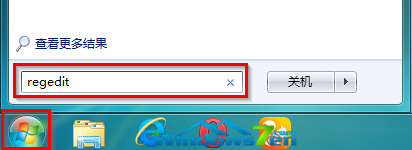
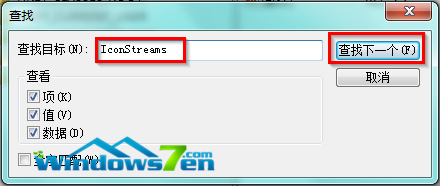
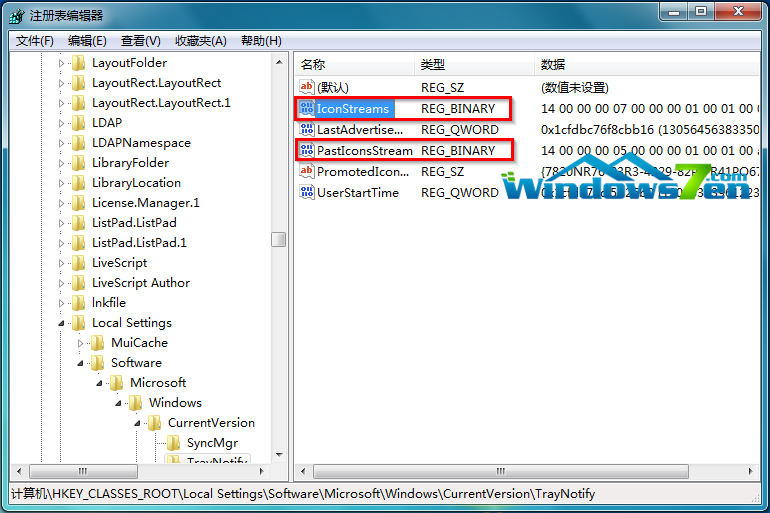
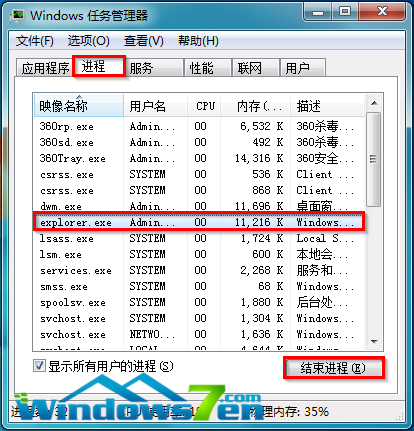
已解除安裝的程式圖示仍留在系統匣「自訂」清單中,無法從介面移除。
regedit
IconStreams
PastIconsStream
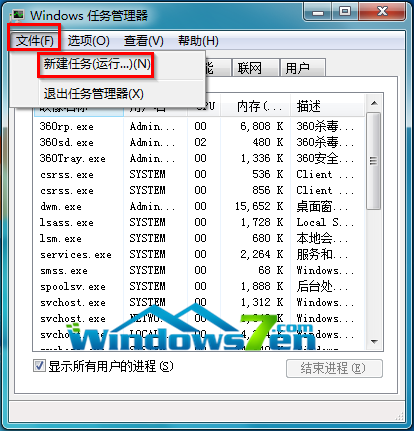
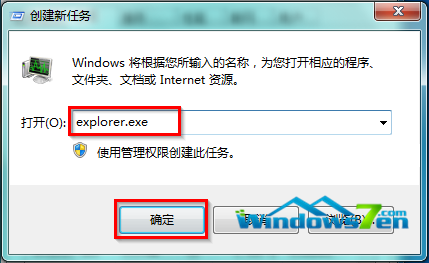
explorer.exe
Win7 .exe 執行檔關聯被修改無法開啟?登錄表修復 .exe 檔案關聯
Win7 使用顯示色彩校正 (DCCW) 完整流程
Windows 7 關閉顯示器色彩校正 (ICC 配置檔) 加速圖片瀏覽
Win7 旗艦版調整滑鼠靈敏度(指標速度)完整教學
Win7 禁用 USB 埠:註冊表修改 USBSTOR Start=4 防止資料外洩
Win7 「自動播放」完整設定指南:關閉彈出視窗、指定程式開啟、每次詢問、依媒體類型自訂
Windows 7 即時偵錯器頻繁彈出徹底解決:IE 腳本偵錯禁用與 VS 註冊表清理雙管齊下
Win7 前面板耳機沒聲音?兩大核心原因與圖文修復教程