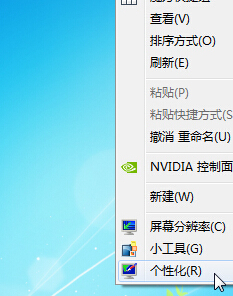
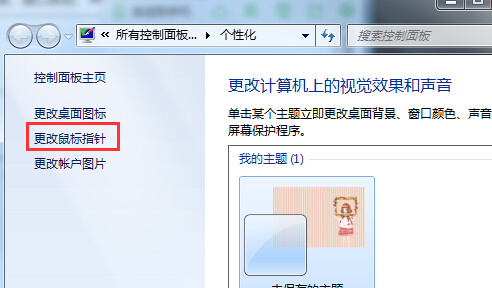
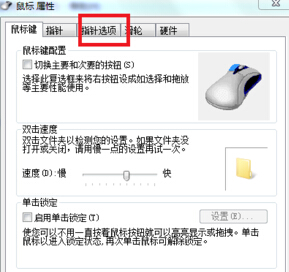
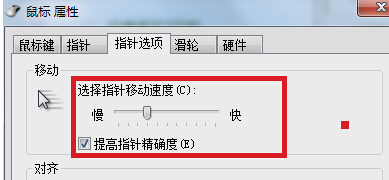
滑鼠指標速度直接影響操作手感,特別是遊戲玩家需精細調整。Win7 透過「個人化」→「變更滑鼠指標」→「指標選項」即可設定。
建議關閉「增強指標精確度」以獲得線性移動手感(遊戲適用)。
筆電 Win7 設定雙網卡同時上網 接口躍點數設定教學
Win7 BitLocker 解鎖後免重啟直接上鎖指令
Windows 7 建立桌面捷徑一鍵休眠:免進開始選單、支援熱鍵喚醒
Windows 7 程式回應緩慢?登錄調整 WaitToKillAppTimeout 加速關閉
Win7 開啟網頁顯示亂碼的解決方法
Windows 7 執行命令大全:Win+R 秒開系統工具、控制台、管理功能
Win7 無法刪除檔案「正在被使用中」?資源監視器精準鎖定進程
Windows 7 快速跳轉列表的另類開啟技巧