Windows XP Windows 7 Windows 2003 Windows Vista Windows 綜合教學 Linux 系統教學
Windows 10 Windows 8 Windows 2008 Windows NT Windows Server 電腦軟體教學
您现在的位置: Windows教程網 >> Windows教程 >  >> Windows Server 系統教學 >> Server 2008

Windows Server 2008 Core 模式管理與配置實戰

編輯:Server 2008

Server Core 僅保留命令列介面,支援檔案、列印、網域控制站、DNS、DHCP、WINS 等角色,以及叢集、NLB、BitLocker、MPIO 等功能。本文延續虛擬機實驗環境,示範 Core 版安裝後的基礎網路設定。

核心網路配置指令

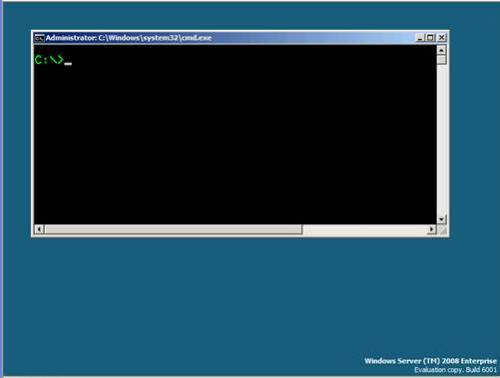
  1. 登入後僅見命令提示字元,無 GUI。
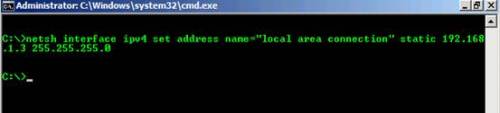
  2. 使用 netsh 設定 IPv4 位址:
    netsh interface ipv4 set address "Local Area Connection" static 192.168.1.3 255.255.255.0
  3. 設定 DNS 伺服器:
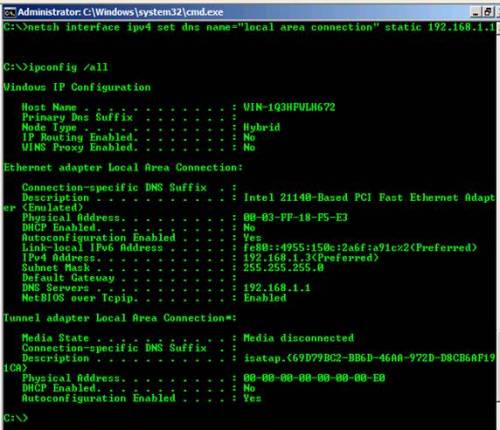
    netsh interface ipv4 set dns "Local Area Connection" static 192.168.1.1
  4. 用 ipconfig /all 驗證設定。

Server Core 命令列介面

netsh 設定 IP 位址

ipconfig 驗證結果

網路參數總覽

  • IP 位址:192.168.1.3
  • 子網路遮罩:255.255.255.0
  • 預設閘道:無
  • DNS 伺服器:192.168.1.1

後續將介紹加入網域、安裝角色等進階管理操作。

Copyright © Windows教程網 All Rights Reserved