Gene6 FTP Server (G6) v3.10 在 Windows Server 2008 安裝授權檔 (registration-key.dat) 後服務無法啟動,主因為資料執行防護 (DEP) 攔截主程式 G6FTPServer.exe。解決方法:在效能選項 DEP 設定中將主程式加入例外,或透過 bcdedit 全域關閉 NX 保護 (僅限測試環境)。
registration-key.dat 至安裝目錄後,「Gene6 FTP Server」服務啟動失敗ntdll.dll、例外碼 0xC0000005 (存取違規)G6FTPServer.exe → 確定 → 套用 → 重開機bcdedit.exe /set {current} nx OptOutIf you're running Windows 2008 or if service no longer starts after license installation, make sure you add g6ftpserver.exe as exception in Control Panel / System / Advanced / Performance / DEP.
Using Windows 2008 R2, run DOS-prompt as Administrator and type "bcdedit.exe /set {current} nx OptOut" and reboot.
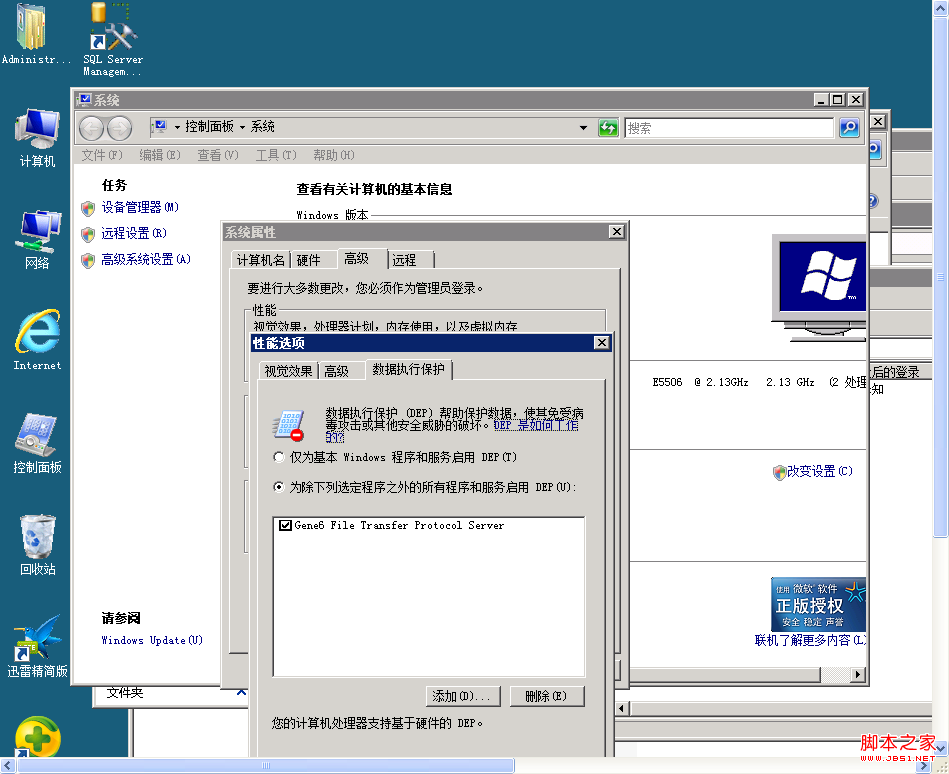
安全性提醒:關閉 NX (No-eXecute) 保護會降低系統對緩衝區溢位攻擊的防禦能力。生產環境**務必採用 DEP 例外**方式,並考慮升級至較新版本的 Gene6 FTP Server (v3.7+ 已修正相容性)。