Server 2008 中 shutdown -s -t 3600 (延遲 1 小時關機) 失效,shutdown /? 顯示 -t 參數範圍被限制為 0-600 秒 (10 分鐘)。
taskschd.msc 開啟任務排程器。shutdown,引數 -s → 確定。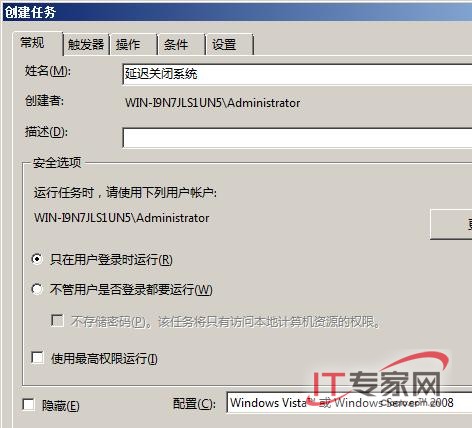
此法繞過 shutdown 內建參數限制,靈活實現任意長度延遲關機。
OEM 廠商聯手微軟推出 Windows Server 2008 Foundation 預裝伺服器
Windows Server 2008 關閉 Ctrl+Alt+Delete 登入強制組合鍵:群組原則設定圖文教學
靈活運用 Windows Server 2008 指令破解系統管理難題
Windows Server 2008 啟用桌面主題與 Aero 效果:安裝桌面體驗功能與 Themes 服務
Windows Server 2008 離線檔案功能啟用與配置指南
面向小企業的 Windows Server 2008 Foundation 全方位解析
Windows Server 2008 AD 管理三大效率技巧:免重啟離線維護、快速資料庫優化與服務控制
Windows Remote Management (WinRM) 快速部署指南:Server Core 單開 80/443 埠即可遠端管理