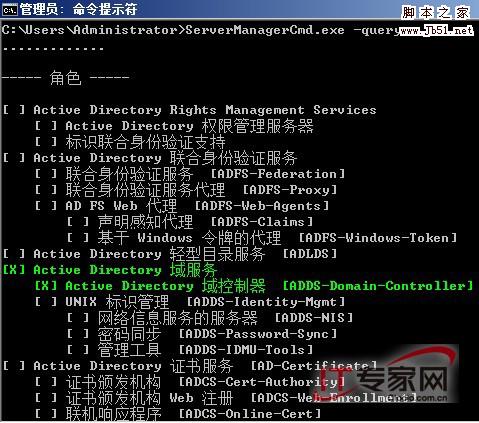
支援查詢、安裝、移除角色、角色服務、功能,適合腳本自動化部署。
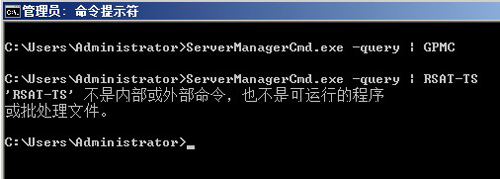
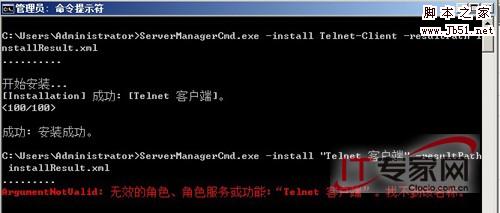
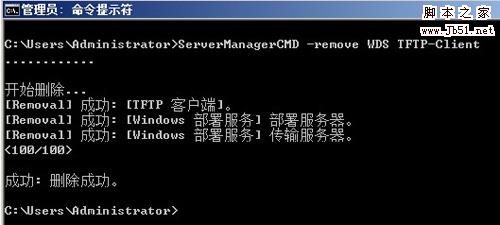
-query:列出已安裝/可用角色與功能 (綠色 [X] 表已裝)。-install <Name> [-resultPath file.xml] [-restart]:安裝指定功能 (需英文名稱,如 Telnet-Client)。-remove <Name1> <Name2> ...:移除多個角色/功能。# 查詢並管道過濾 ServerManagerCmd.exe -query | findstr GPMC # 安裝 Telnet 用戶端並記錄結果 ServerManagerCmd.exe -install Telnet-Client -resultPath installResult.xml # 同時移除 WDS 角色與 TFTP 用戶端 ServerManagerCmd.exe -remove WDS TFTP-Client
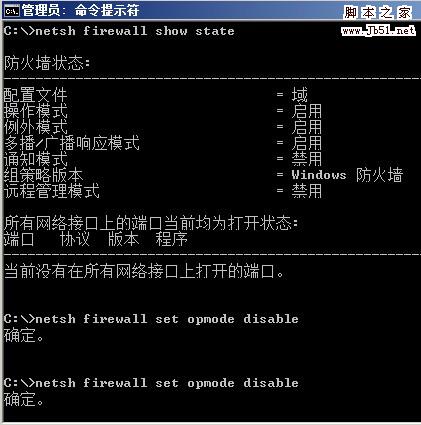
netsh firewall show state
netsh firewall set opmode enable
netsh firewall set opmode disable
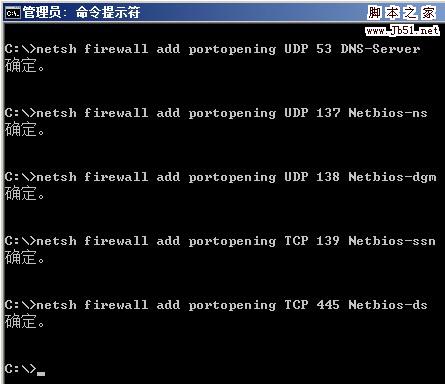
netsh firewall add portopening UDP 53 "DNS-Server"
netsh firewall add portopening UDP 137 "NetBIOS-NS"
netsh firewall add portopening UDP 138 "NetBIOS-DGM"
netsh firewall add portopening TCP 139 "NetBIOS-SSN"
netsh firewall add portopening TCP 445 "NetBIOS-DS"
命令列操作不僅效率高、可腳本化,更能在 Server Core 無 GUI 環境下完整管理伺服器。
Microsoft WSUS 3.0 安裝與配置完整圖文教學
免光碟硬碟安裝 Windows Server 2008 圖文教學:從 ISO 解壓到 setup.exe 執行
Windows PowerShell 系統管理新體驗:從入門到實戰技巧
Windows Server 2008 無線網卡驅動正常但無法啟用 (灰色禁用) 解決辦法
停用 Windows Module Installer 服務 提升網路更新效能
Windows Server 2008 內建磁碟管理無損分區完整教學:壓縮磁碟建立新分區、刪除分區合併擴充