Windows XP Windows 7 Windows 2003 Windows Vista Windows 綜合教學 Linux 系統教學
Windows 10 Windows 8 Windows 2008 Windows NT Windows Server 電腦軟體教學
您现在的位置: Windows教程網 >> Windows教程 >  >> Windows 綜合教學 >> 關於 Windows

Windows 7 旗艦版 EFS 加密檔案/資料夾解密教學:屬性進階取消加密屬性

編輯:關於 Windows

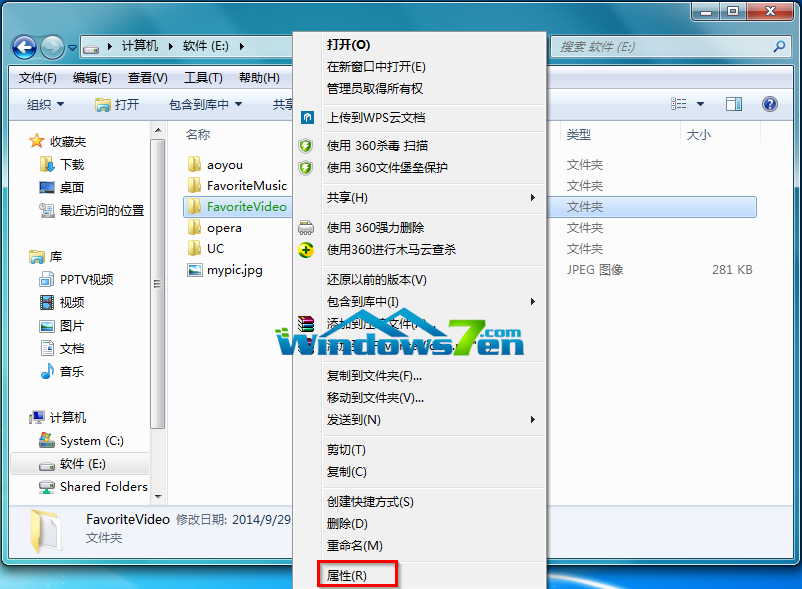
Windows 7 旗艦版支援 EFS (Encrypting File System) 加密檔案/資料夾(顯示為綠色文字)。解密步驟:

  1. 選中加密檔案/資料夾右鍵 → 「內容」。
    右鍵內容
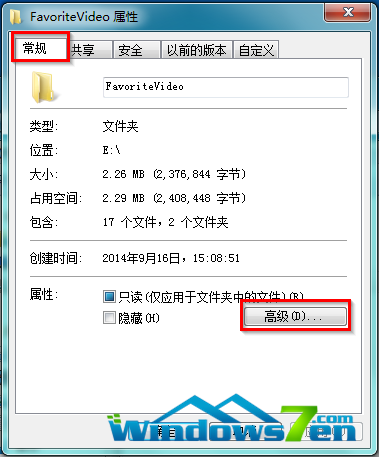
  2. 「一般」索引標籤 → 「進階」。
    一般進階
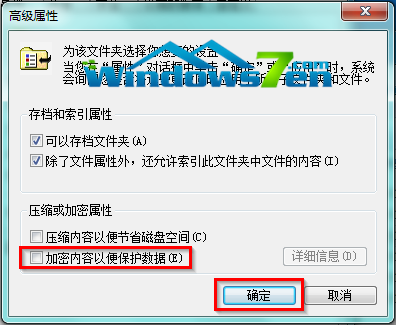
  3. 取消勾選 「加密內容以保護資料 (E)」 → 確定。
    取消加密勾選
  4. 回到「一般」頁籤 → 確定。
  5. 「確認屬性變更」視窗:預設「將變更套用至這個資料夾、子資料夾和檔案」→ 確定。
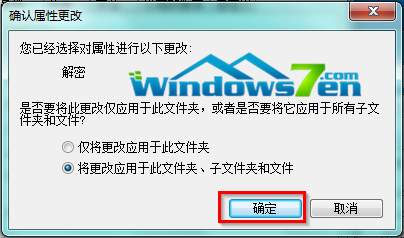
    確認屬性變更
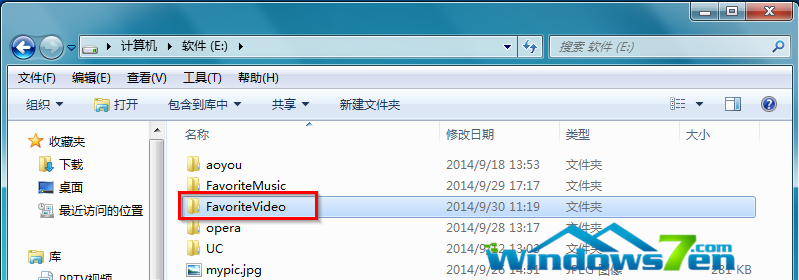
  6. 完成後檔案/資料夾名稱由綠色變回黑色。
    解密後變黑色

⚠ 提醒

若選擇「僅將變更套用至這個資料夾」,子檔案/資料夾仍保持加密。新建檔案在已解密資料夾中不會自動加密。

Copyright © Windows教程網 All Rights Reserved