Windows XP Windows 7 Windows 2003 Windows Vista Windows 綜合教學 Linux 系統教學
Windows 10 Windows 8 Windows 2008 Windows NT Windows Server 電腦軟體教學
您现在的位置: Windows教程網 >> Windows教程 >  >> Windows 綜合教學 >> 關於 Windows

Win10 IE11 提示未安裝 Flash Player?系統內建 Flash 損壞修復完整教學

編輯:關於 Windows

Win10 IE11 瀏覽網頁提示「未安裝 Flash Player」:

原因分析:

系統內建 Flash 檔案損壞。注意:Win10 不支援獨立安裝 Flash,必須修復系統元件。

修復步驟(操作前請備份同名資料夾檔案):

  1. 刪除 C:\Windows\System32\Macromed\Flash 內所有檔案(若無法刪除,需進安全模式或 WinPE 強制覆蓋)。

  2. 下載對應版本的 Win10 Flash Player 檔案(分 32 位元 / 64 位元),解壓縮後複製到上述目錄。
  3. 路徑差異注意:
    • Win10 32位:僅 C:\Windows\System32\Macromed\Flash
    • Win10 64位:C:\Windows\System32\Macromed\Flash 與 C:\Windows\SysWOW64\Macromed\Flash 兩者皆需覆蓋
  4. 以管理員身分開啟「命令提示字元」。
  5. 依序輸入指令註冊元件:
cd C:\Windows\System32\Macromed\Flash
regsvr32 Flash.ocx

cd C:\Windows\SysWOW64\Macromed\Flash
regsvr32 Flash.ocx
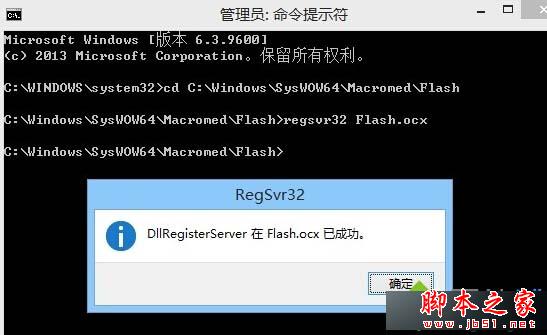
  1. 重新開機驗證 IE11 是否正常載入 Flash 內容。

補充: 若仍無法解決,嘗試使用 Flash 官方自動更新工具修復。

Copyright © Windows教程網 All Rights Reserved