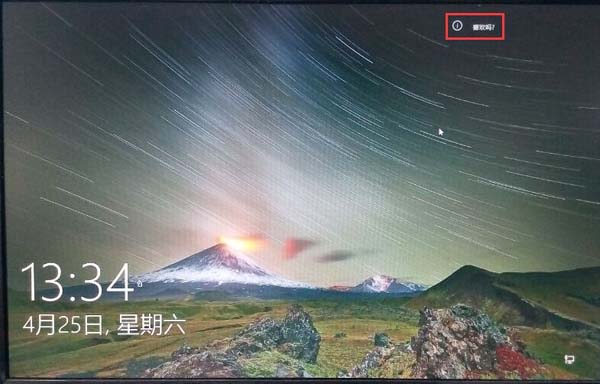
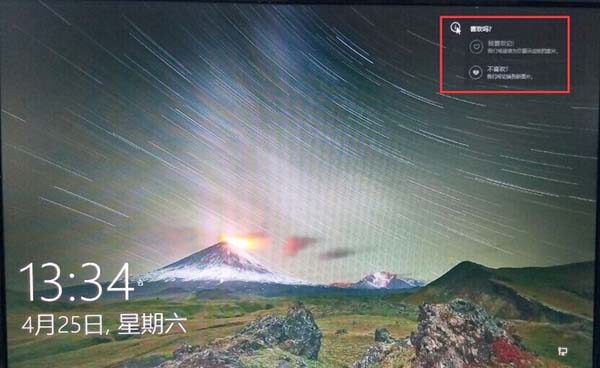
Win10 10061鎖定畫面壁紙存放於:
C:\Users\用戶名\AppData\Local\Packages\Microsoft.Windows.ContentDeliveryManager_cw5n1h2txyewy\LocalState\Assets
關鍵點:
Microsoft.Windows.ContentDeliveryManager_ 前綴固定,後綴隨機。.jpg 才能預覽/提取。新發現:鎖定畫面出現 「喜歡嗎?」 按鈕,點選「我喜歡」保留、「不喜歡」下次替換,訓練推薦演算法。
Win10 將「這台電腦」固定至任務列:建立捷徑拖曳法,比檔案總管更符合習慣
Win7 實用技巧:批次重新命名檔案與安裝攝影機小工具拍照錄影
Win8 提示「無效的產品金鑰」錯誤碼 0x80070424?匯入登錄檔重建 Software Protection 服務修復授權
Win10 替換回 Win7 經典任務管理器:利用 IFEO 除錯器機制導入舊版 taskmgr 並修改登錄
Win10 Mobile Build 10080 嚴重 Bug 修復:商店下載卡住問題已解,部分應用仍異常
解決殺毒後 Windows 桌面消失:explorer.exe 恢復完整指南