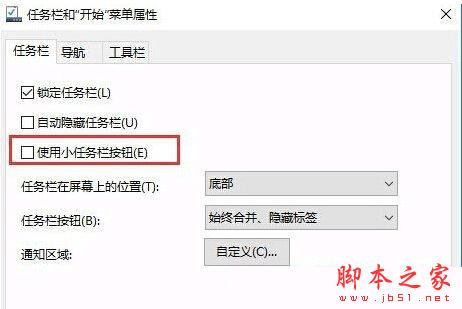
Win10 任務列右鍵選單中找不到 Cortana 的「顯示搜尋框」選項?
任務列設定為「使用小工作列按鈕」,導致搜尋框無法顯示,相關選項自然隱藏。
兩步操作即可恢復 Cortana 完整搜尋框與相關設定選項。
Win10 TH2 首個重大更新普遍 Bug:開機進入兩次啟動畫面導致速度變慢
Win10 預覽版 11102 多國語言包官方 ISO 下載大全 (32/64 位、中英日韓德法俄等)
Win10 累積更新 KB3124200 安裝失敗?手動下載離線安裝包解決
sgtool.exe 是什麼程序?搜狗輸入法加速啟動項錯誤解決方法
Win7 64位元攝影機驅動黃色驚嘆號無法使用?刪除登錄 UpperFilters 值修復
快播提示「該網站不可點播」怎麼辦?降級安裝精簡版/不升級版完整解決方案
Win10 區域網路無法存取其他電腦?啟用「不安全來賓登入」登錄值 + 開啟網路探索與檔案共享
Win10 新功能曝光:改善 4K 高解析度螢幕顯示效果,修正 DPI 縮放模糊問題