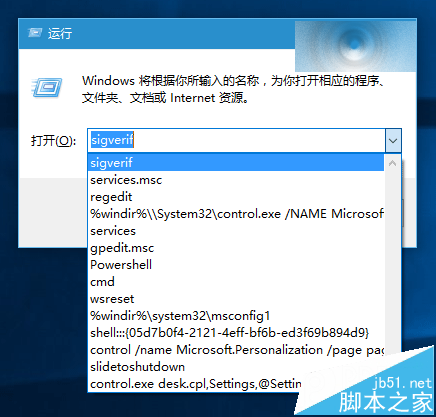
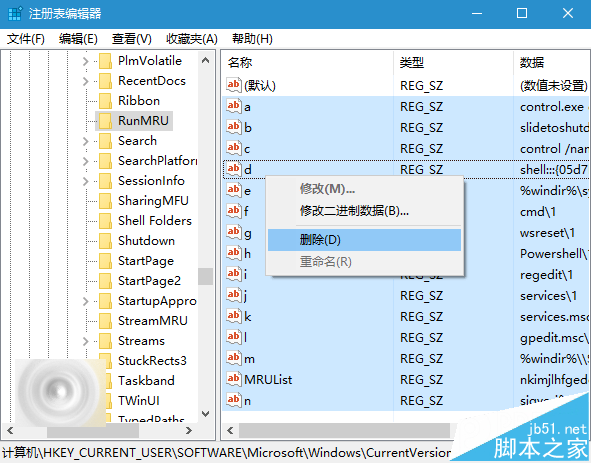
Win10 「執行」對話框會保留歷史指令,可能洩露隱私。可透過登錄編輯器刪除歷史記錄,或使用軟媒魔方備份後一鍵清理/還原。
regedit
HKEY_CURRENT_USER\Software\Microsoft\Windows\CurrentVersion\Explorer\RunMRU
微軟未來可能在設定中內建清除「執行」歷史功能,目前仍需手動修改登錄。
Win10 RS1 Build 11102 實測體驗:Edge 細節改進,底層重構為主
Win10 Mobile 10080 推送時間確認:內測完成,預計本週釋出,新增 Beta Store、通用 Office、更多機型支援
Win10 修改本地使用者密碼兩大法:電腦管理與控制台
Windows 10 設定 Win+E 快捷鍵直接開啟「這台電腦」而非首頁
Win7 更新顯示卡驅動後出現花屏/黑屏/解析度異常?原因與解決方案完整分析
Win10 無法執行《刺客教條:梟雄》解決方案:四種破解/正版方案嘗試順序
Windows 10 技術預覽版啟用隱藏通知中心功能:第三方工具教學
Windows 7 設定螢幕保護程式完整步驟教學