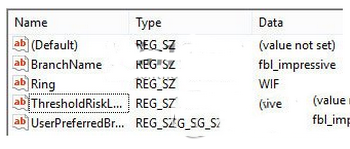
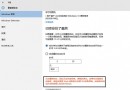
早期網傳修改登錄檔查看新版本方法,導致許多用戶無法正常升級 (錯誤 0x80246017)。微軟 Gabe Aul 提供修復方案:還原 HKEY_LOCAL_MACHINE\SOFTWARE\Microsoft\WindowsSelfHost\Applicability 關鍵值。
HKEY_LOCAL_MACHINE\SOFTWARE\Microsoft\WindowsSelfHost\Applicability
regedit
FBL_IMPRESSIVE
low
微軟仍在尋找更完美的大眾化解決方案,上述方法可解決多數受影響用戶問題。
Classic Shell 讓 Windows 8 找回經典開始選單 + 工具列替代方案
Win8 安裝 .NET Framework 4.6 失敗?直接啟用 Windows 功能即可
Win7 遊戲無法全螢幕?四大解決方案:解析度匹配、驅動更新、ATI 設定、登錄表修改
Win7 筆電開啟虛擬 WiFi 熱點共享上網:netsh 指令建立託管網路、ICS 共享、啟動熱點
Windows 7 忘記登入密碼解決方案:建立密碼重設磁碟 (USB/記憶卡) 完整教學
Win10 記憶體佔用持續飆升導致崩潰?註冊表修改停用 TimeBroker 與 Superfetch 服務修復記憶體洩漏
Win10 預覽版可免費轉正,無需驗證正版授權
Win10 PC RS2 Build 14926 更新與修復內容彙總:Edge 網頁設定小娜提醒、預覽版不重裝已移除 App、Pin 碼小鍵盤常駐、修復 Adobe Acrobat/個性化崩潰/Atom 顯示/全螢幕遊戲解析度/Kindle 藍屏/Edge 穩定性/任務列自動隱藏等