Windows 8 移除傳統開始選單,改為全螢幕 Metro 介面,非觸控裝置操作極差。免費開源工具 Classic Shell 可完美復刻 Windows 7 風格開始選單,並整合 Metro 應用啟動器。
Classic Shell 方案
- 下載:Classic Shell 官網(現已停更,建議改用 Open-Shell 繼承版)。
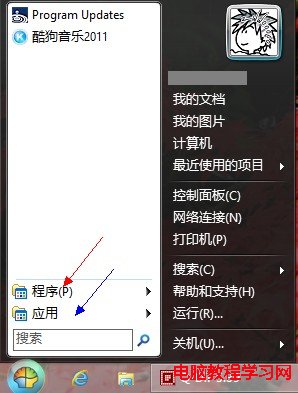
- 安裝時選擇 「Classic with two columns」 風格,並勾選「開始按鈕樣式」為 Windows 7 Aero。
- 安裝完成即擁有傳統開始選單,紅框處為「所有程式」,藍框處為 Metro 應用入口。
內建工具列替代方案(無需第三方軟體)
- 工作列右鍵 → 工具列 → 新增工具列…
- 資料夾路徑輸入:
C:\ProgramData\Microsoft\Windows\Start Menu\Programs
- 工作列右側會出現「程式」工具列,點擊展開即為傳統開始選單程式清單。
現代建議
- Classic Shell 專案已於 2017 年停止維護,Open-Shell (GitHub) 繼續更新,支援 Windows 10/11,相容性更佳。
- Windows 10/11 內建開始選單已大幅改良,若非極度依賴 Win7 風格,建議適應原生介面。