Windows 8.1 內建磁碟清理工具可深度掃描並清理暫存檔、更新快取、錯誤報告、Windows.old 等佔用空間的系統垃圾,操作簡單安全。
深度清理步驟
- 「電腦」/「這台電腦」→ 右鍵系統碟(C:)→ 「內容」→「磁碟清理」。
- 等待初步掃描完成。
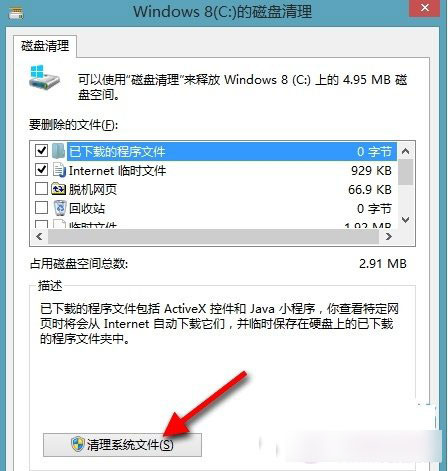
- 關鍵步驟: 點選「清理系統檔案」→ 重新掃描(需管理員權限)。
- 勾選所有項目(特別注意:
- Windows 更新清理(已取代的更新備份)
- 裝置驅動程式套件(舊版驅動)
- 之前的 Windows 安裝(Windows.old,升級殘留,通常數 GB)
- 暫存檔案、錯誤報告、縮圖快取 等
- 確定 → 「刪除檔案」→ 等待完成。
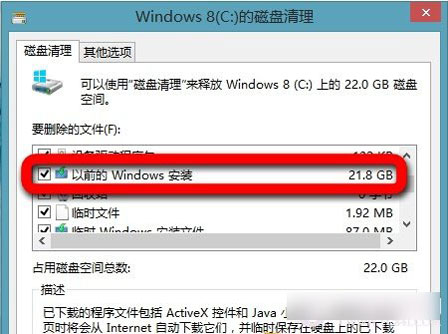
效果
- 升級安裝(保留檔案/應用程式)後,
Windows.old 通常佔 5~20 GB,清理後 C: 空間大幅釋放。
- 定期執行可保持系統精簡、提升磁碟 I/O 效能。
補充:命令列自動化
cleanmgr /sageset:1 設定清理項目配置檔。cleanmgr /sagerun:1 無訊息執行清理,適合排程任務。
磁碟清理是 Windows 官方最安全的清理工具,無需第三方「垃圾清理大師」,避免誤刪關鍵系統檔案。