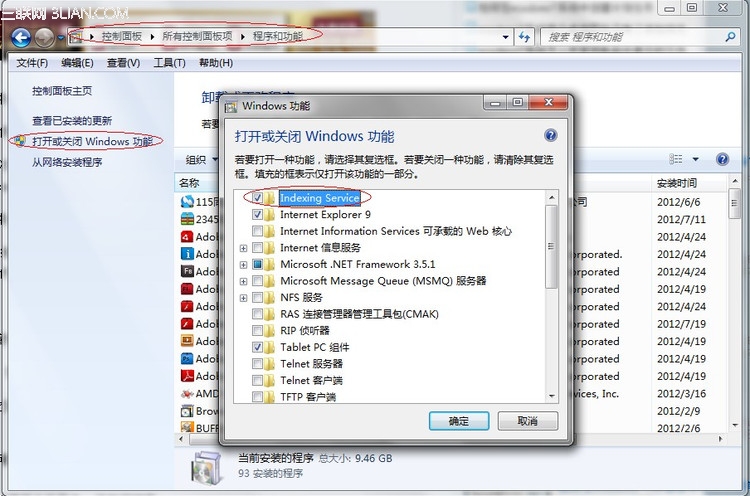
加入網域或切換帳號後,資料夾右上角搜尋框無法使用,「執行」指令也失效?這是因為 Windows Search 服務未啟用。解決方法:
重開機後,系統會自動建立索引,資料夾搜尋與「執行」指令即可恢復正常。若索引建立緩慢,可在「索引選項」中調整包含位置或暫停索引以釋放資源。
Win7 無法開啟 NVIDIA 控制面板?重裝驅動、啟用服務、啟動項三步修復
Win7 顯卡硬體加速開關失效?修改系統檔案與登錄啟用「疑難排解」選項
四招解決 Windows 7 輸入法圖示消失、無法切換問題
Win7 旗艦版 Windows 資訊安全中心無法開啟修復教學
Windows 7 桌機無法調整螢幕解析度五大排查方向
Win7 安裝常見 6 大錯誤代碼與解決方案:從 Please wait 到臨時資料夾建立失敗
Win7 指令建立虛擬 Wi-Fi 熱點 (Hosted Network) 共享上網完整教學
Win7 顯示隱藏檔案與資料夾快速設定