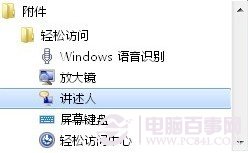
Windows 7 內建無障礙工具「敘述者」,可朗讀作用中視窗內容、選單選項、鍵盤輸入文字,支援中英文語音、語速、音量、音調調整,並可設定開機自動啟動。
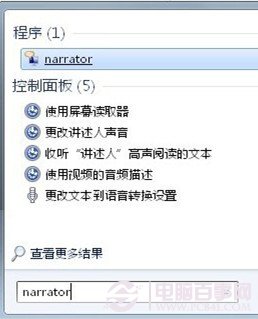
narrator
開啟記事本輸入英文字母,敘述者會以標準美式英語逐字唸出;中文輸入則以標準中文朗讀。適用於記事本、寫字板、IE、控制台、桌面、安裝精靈等程式。
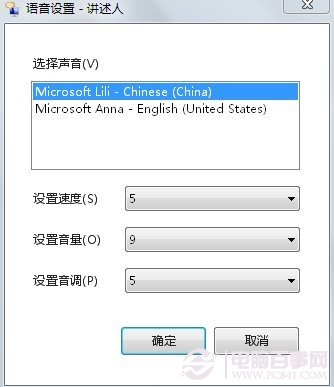
於「語音設定」可切換中英文語音、調整語速、音量、音調,滿足個人化聽覺需求。
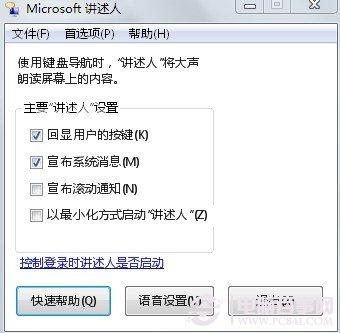
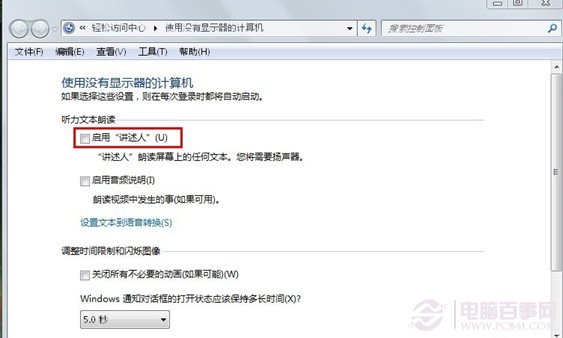
點選「控制敘述者是否在登入時啟動」→勾選「聽力文本朗讀」區域選項即可。
Win7 最快清理系統垃圾:自製 clean.bat 一鍵刪除 tmp/log/gid/chk/old/bak/回收筒/預讀/Cookie/暫存網頁檔
Win7 旗艦版透過群組原則禁用 USB 隨身碟/行動硬碟
Windows 7 Aero Snap 經常誤觸發?三步驟徹底停用邊緣吸附最大化
Win7 開始功能表「附屬應用程式」工具遺失?指令喚醒與捷徑還原雙管齊下
Win7 開機提示 iertutil.dll 遺失:從 dllcache 還原修復
Win7 Aero 玻璃透明效果開啟/關閉:視窗色彩設定與主題切換
微軟變革 Windows 7 研發流程:客戶主導、兼容優先
Win7 旗艦版無法開啟「家長控制」?建立標準帳號即可啟用