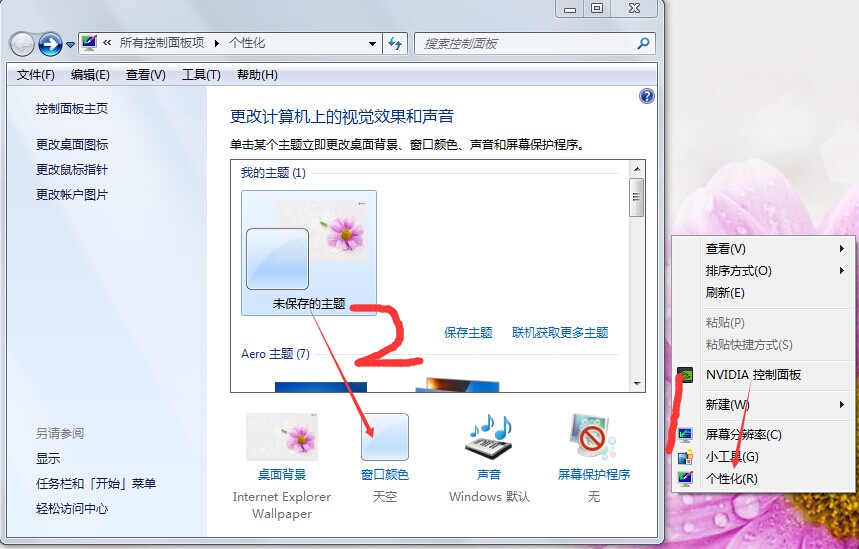
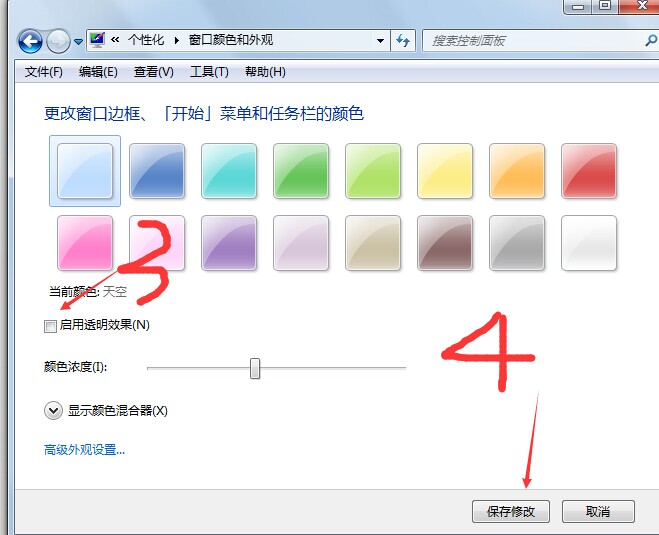
非 Aero 主題(如基本、高對比)不支援透明效果,切換主題前請確認。
關閉透明度可釋放顯示記憶體與 GPU 資源,提升舊機種流暢度。
Windows 7 佛山上網本市場遇冷:續航力下降成主因
Win7 讓系統識別 .rmvb/.rm 影片格式:註冊表新增 PerceivedType=video
Windows 7 怎麼看已連線 WiFi 密碼?三步驟顯示字元找回金鑰
Win7 工作列「資料庫」圖示釘選常用資料夾:拖曳即用、右鍵快速開啟
Windows 7 區域網路設定教學:統一工作群組與電腦名稱
Win7 PotPlayer新增外掛字幕?拖曳SRT/ASS檔案或選單載入兩種方法
Windows XP 無法開啟 exFAT 格式 USB 解決:安裝 KB955704 更新補丁
Windows 7 批次重新命名檔案教學:利用 Excel 公式產生 .bat 執行檔