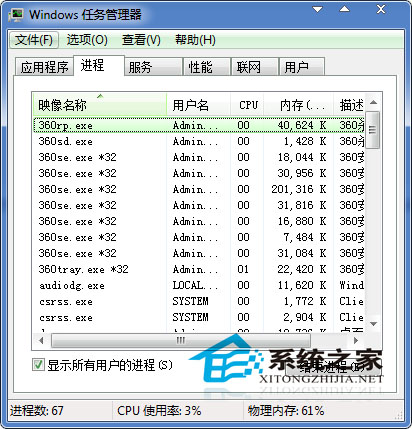
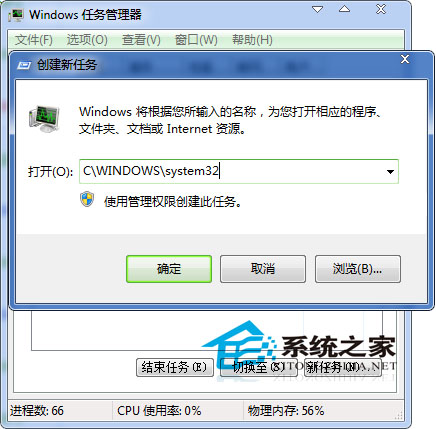
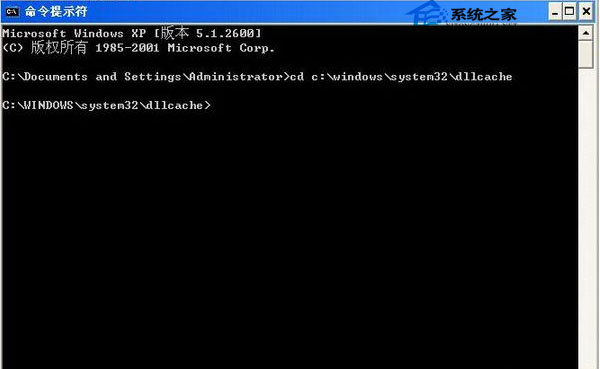
解除安裝 Internet Explorer 導致 iertutil.dll 遺失,開機進入桌面後反覆彈出錯誤視窗。
iertutil.dll
C:\Windows\System32
cmd.exe
cd C:\Windows\System32\dllcache
copy iertutil.dll C:\Windows\System32
若系統無法開機進入桌面,需使用安裝光碟進入修復環境命令提示字元執行相同複製指令。修復後建議重新安裝 IE 或更新至較新版本。
Windows 7 記憶體佔用過高?五大優化步驟釋放資源
關閉 WMP12 視訊加速降低 Win7 CPU 占用:現代硬體已無需此舊功能
Win7 錯誤報告彈窗太煩人?註冊表 DontShowUI=1 靜默上報不彈窗
Win7 如何建立無法刪除的資料夾?命令提示字元建立特殊命名資料夾
Win7 硬碟故障頻繁讀寫?同樣四步驟優化延長壽命
Windows 7 內建燒錄功能教學:兩種燒錄模式差異與操作步驟
Windows 7 企業版新功能深度解析:PowerShell 2.0、虛擬化與桌面管理利器
Windows 7調節螢幕亮度完整圖文教程