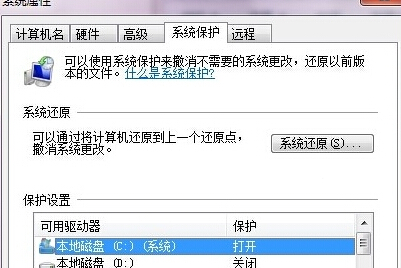
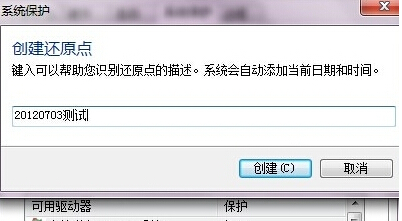
安裝新軟體、驅動或更新前,建立還原點可在出問題時快速復原。Win7 內建系統保護功能操作簡單。
日後若系統不穩,可進入「系統還原」選擇此點復原。
Win7 新增網路印表機完整圖文教學:IP 連線與驅動安裝全攻略
Windows 7 32位元 修正日期時間錯誤教學
Win 7 與 iPhone 不和諧?英特爾 P55 晶片組成禍首
解鎖 Win7「上帝模式」:一個資料夾掌控 272 項系統設定
Win7 XP Mode 存在 6 大問題:虛擬工具缺失、雙系統管理負擔、威脅主機安全、安全成本雙倍、配置門檻高、只是暫時緩兵之計
Ping 指令進階技巧:IP 簡寫、數字串代替 IP、網路故障分級診斷流程
調整 Windows 7 系統還原磁碟空間佔用:三步驟自訂配額或徹底停用
Win7 鎖定/登入畫面直接關機:按電源鍵一秒搞定,免輸密碼