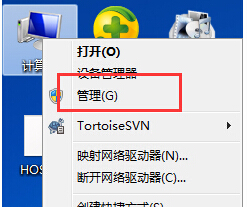
唯有管理員帳號具備修改其他使用者密碼權限。透過「電腦管理」→「本機使用者和群組」即可重設密碼。
適用於使用者忘記密碼、管理員代管重設等情境。
Win7 設定自動取得 IP 位址 (DHCP) 步驟
Win7 32 位元部分網站打不開?4 大原因與解決對策
微軟打擊 Win7 盜版:KB971033 偵測 70 種破解工具,桌面變黑
Win7 休眠後無法喚醒?電源選項設定硬碟「永不關閉」與開啟休眠功能教學
Win7 旗艦版瀏覽器網頁輸入框無法輸入文字?刪除登錄 EnableUIPI 修復 IE9/IE10 滾輪失效 Bug
Win7 ReadyBoost 加速:用 USB 隨身碟/SD 卡當快取,不加記憶體也能提速
Win7 放大鏡不只放大:多種模式與快捷鍵大全
Windows 7 無聲音?ThinkPad T61 實戰排查:驅動正常卻靜音、重裝驅動無效、最終發現是輸出裝置被靜音