Win7 內建 ReadyBoost 功能,允許將符合速度規格的 USB 隨身碟 (或 SD 卡) 當作快取,加速系統回應。以下為啟用條件與步驟:
前置條件
- 隨身碟支援 ReadyBoost (包裝標示「高速」或「ReadyBoost 相容」)。
- 剩餘空間至少 256 MB (建議 1 GB 以上效果明顯)。
- 格式化為 NTFS 或 exFAT (FAT32 單檔 4GB 限制影響效能)。
啟用步驟
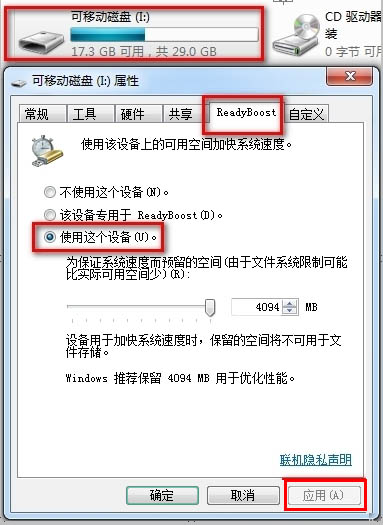
- 插入隨身碟,自動播放視窗選「加速我的系統」,或右鍵隨身碟 → 「內容」 → 「ReadyBoost」索引標籤。
- 選擇「使用這個裝置」,調整「保留給系統加速的空間」 (建議留 1~4 GB)。
- 按確定,系統開始建立快取檔
ReadyBoost.sfcache。
效果說明
- 對記憶體 4GB 以下的舊電腦,開啟大型遊戲、渲染、繪圖軟體時提升明顯。
- 記憶體 8GB 以上或搭配 SSD 的新電腦,效果較不明顯。
- 隨身碟讀寫速度越快 (USB 3.0 優於 2.0),加速效果越好。
注意:啟用 ReadyBoost 的隨身碟不宜頻繁拔插,建議固定留在機箱後方 USB 埠長期使用。