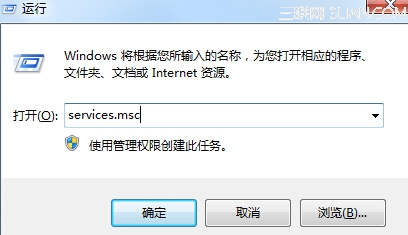
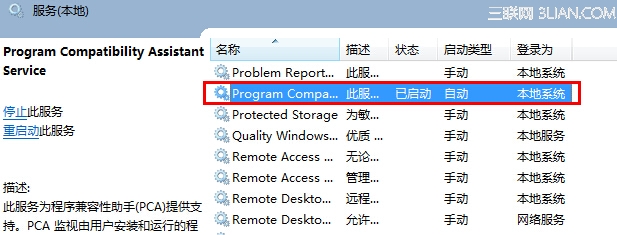
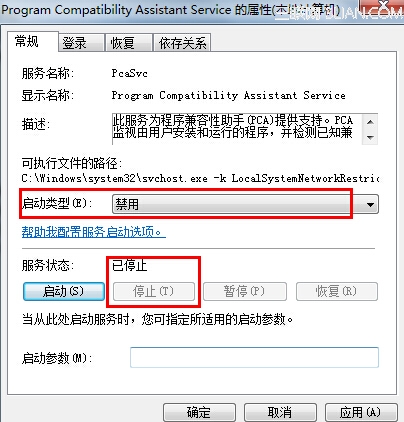
執行舊程式時總跳出「程式相容性助手」詢問是否修正?其實程式多無相容問題,只是未指定相容模式。可透過停用服務徹底關閉提示:
services.msc
注意: 設定需重新開機才生效。若不想重開機,可在工作管理員結束 CompatTelRunner.exe 進程暫時緩解。停用後舊程式仍可正常執行,若真有相容問題,可手動右鍵程式 → 內容 → 相容性 標籤設定。
CompatTelRunner.exe
用 Win7 必須掌握的三項技能:問題步驟記錄器、硬體故障排查、動態記憶體管理
Win7 BitLocker To Go:隨身碟/行動硬碟全盤加密,多層防護數據安全
Win7 修改程式預設安裝目錄:登錄表 + 資料夾複製權限完整教學
Windows 7 進階程序管理工具:Windows 程序管理器功能詳解與惡意程序偵測實戰
Windows 7 資料庫排列/篩選/標記/評等:海量照片文件秒速定位實戰技巧
Win7 如何將 IE 瀏覽器主頁設為空白頁?防劫持教學
Win7 64 位元迅雷看看播放綠畫面兩大解決方案
Windows 7 群組原則限制 USB 隨身碟:僅允許特定裝置啟動,防範惡意程式傳播