Windows XP Windows 7 Windows 2003 Windows Vista Windows 綜合教學 Linux 系統教學
Windows 10 Windows 8 Windows 2008 Windows NT Windows Server 電腦軟體教學

Win10 關機時強制更新太久?本機群組原則關閉「安裝更新並關機」提示

編輯:Windows 10 系統介紹

Windows 10 關機時若出現「請勿關閉電腦,正在安裝更新」,導致關機時間大幅拉長。透過本機群組原則編輯器可停用此行為,讓關機恢復迅速。

關閉關機更新提示步驟

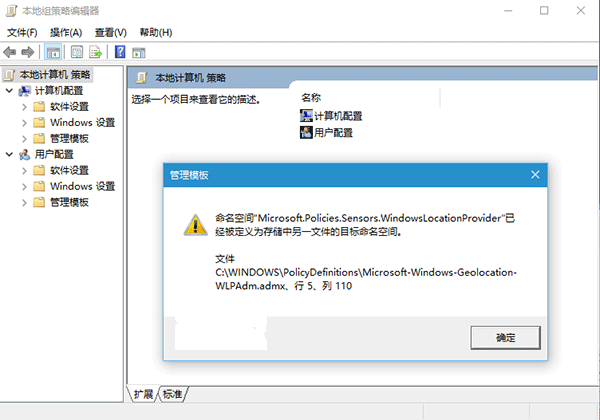
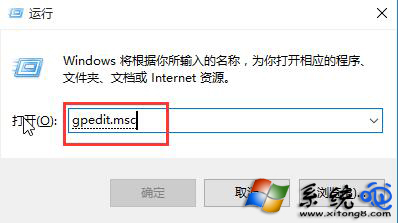
  1. 按 Win + R 輸入 gpedit.msc 開啟本機群組原則編輯器(僅專業版/企業版/教育版支援)。
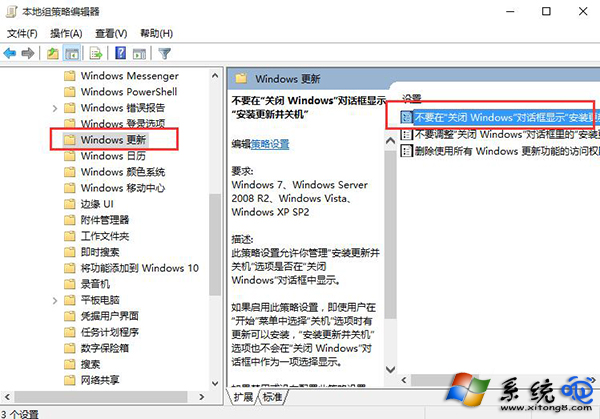
  2. 依序展開:
    「使用者設定」 → 「系統管理範本」 → 「Windows 元件」 → 「Windows Update」。
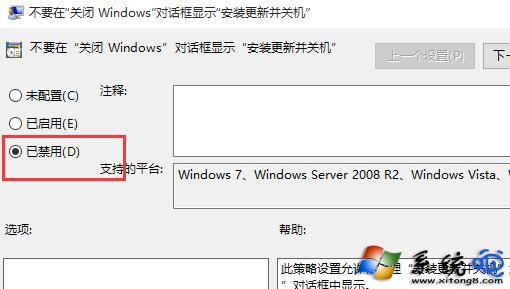
  3. 右側雙擊「在關閉 Windows 對話方塊中不顯示『安裝更新並關機』」。
  4. 選擇「已停用」 → 「確定」。

注意:家庭版無群組原則編輯器,可嘗試修改登錄檔 HKEY_LOCAL_MACHINE\SOFTWARE\Policies\Microsoft\Windows\WindowsUpdate\AU 新增 DWORD NoAutoUpdate = 1,或使用第三方工具管理更新行為。若未來需恢復,將設定改回「已啟用」或「未設定」即可。

Copyright © Windows教程網 All Rights Reserved