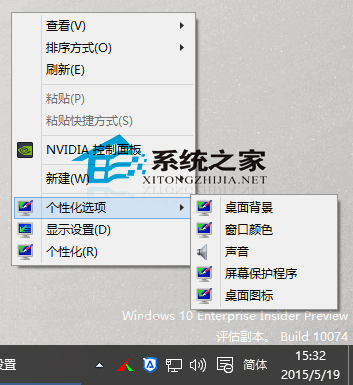
Windows 10 逐步以新版「設置」取代傳統控制面板,「個性化」介面亦完成改版。若習慣舊版風格,可通過修改登錄,將「桌面背景、色彩、聲音、螢幕保護、桌面圖示」等常用項直接加入桌面右鍵菜單,點擊即跳轉至傳統控制面板對應頁面。
Windows Registry Editor Version 5.00
; Created by https://winaero.com, reedited by https://ithome.com
[HKEY_CLASSES_ROOT\DesktopBackground\Shell\Appearance]
"MUIVerb"="個性化選項"
"SubCommands"="Wallpaper;Colors;Sounds;Screensaver;Icons"
"icon"="desk.cpl"
"Position"="Bottom"
[HKEY_LOCAL_MACHINE\SOFTWARE\Microsoft\Windows\CurrentVersion\Explorer\CommandStore\shell\Screensaver]
@="屏幕保護程序"
"Position"="Bottom"
"Icon"="desk.cpl"
[HKEY_LOCAL_MACHINE\SOFTWARE\Microsoft\Windows\CurrentVersion\Explorer\CommandStore\shell\Screensaver\Command]
@="rundll32.exe shell32.dll,Control_RunDLL desk.cpl,screensaver,@screensaver"
[HKEY_LOCAL_MACHINE\SOFTWARE\Microsoft\Windows\CurrentVersion\Explorer\CommandStore\shell\Sounds]
@="聲音"
"Position"="Bottom"
"Icon"="mmsys.cpl"
[HKEY_LOCAL_MACHINE\SOFTWARE\Microsoft\Windows\CurrentVersion\Explorer\CommandStore\shell\Sounds\Command]
@="rundll32.exe shell32.dll,Control_RunDLL mmsys.cpl ,2"
[HKEY_LOCAL_MACHINE\SOFTWARE\Microsoft\Windows\CurrentVersion\Explorer\CommandStore\shell\Wallpaper]
@="桌面背景"
"Icon"="%SystemRoot%\\System32\\desk.cpl"
"Position"="Bottom"
[HKEY_LOCAL_MACHINE\SOFTWARE\Microsoft\Windows\CurrentVersion\Explorer\CommandStore\shell\Wallpaper\Command]
@="control.exe /NAME Microsoft.Personalization /PAGE pageWallpaper"
[HKEY_LOCAL_MACHINE\SOFTWARE\Microsoft\Windows\CurrentVersion\Explorer\CommandStore\shell\Icons]
@="桌面圖標"
"Icon"="%SystemRoot%\\System32\\desk.cpl"
"Position"="Bottom"
[HKEY_LOCAL_MACHINE\SOFTWARE\Microsoft\Windows\CurrentVersion\Explorer\CommandStore\shell\Icons\Command]
@="rundll32 shell32.dll,Control_RunDLL desk.cpl,,0"
[HKEY_LOCAL_MACHINE\SOFTWARE\Microsoft\Windows\CurrentVersion\Explorer\CommandStore\shell\Colors]
@="窗口顏色"
"Icon"="%SystemRoot%\\System32\\desk.cpl"
"Position"="Bottom"
[HKEY_LOCAL_MACHINE\SOFTWARE\Microsoft\Windows\CurrentVersion\Explorer\CommandStore\shell\Colors\command]
@="control.exe /NAME Microsoft.Personalization /PAGE pageColorization"
gxh.reg(副檔名 .reg),雙擊執行 → 是 → 確定。同理建立 gxh0.reg,內容如下:
Windows Registry Editor Version 5.00
[-HKEY_CLASSES_ROOT\DesktopBackground\Shell\Appearance]
[-HKEY_LOCAL_MACHINE\SOFTWARE\Microsoft\Windows\CurrentVersion\Explorer\CommandStore\shell\Screensaver]
[-HKEY_LOCAL_MACHINE\SOFTWARE\Microsoft\Windows\CurrentVersion\Explorer\CommandStore\shell\Sounds]
[-HKEY_LOCAL_MACHINE\SOFTWARE\Microsoft\Windows\CurrentVersion\Explorer\CommandStore\shell\Wallpaper]
[-HKEY_LOCAL_MACHINE\SOFTWARE\Microsoft\Windows\CurrentVersion\Explorer\CommandStore\shell\Icons]
[-HKEY_LOCAL_MACHINE\SOFTWARE\Microsoft\Windows\CurrentVersion\Explorer\CommandStore\shell\Colors]
雙擊執行即可還原預設右鍵菜單。若遇右鍵「個性化」報錯,嘗試切換登入帳號可解決。
Win10 磁碟佔用 100% 導致系統卡頓?六大核心原因與解決方案:家庭群組、虛擬記憶體、IPv6、Defender、Search、SSD 終極方案
Windows 10 專屬頭像線上產生器:上傳照片加入 Win10 Logo 三步驟完成
Win10 檢查與安裝系統更新完整教學:從「這台電腦」屬性進入 Windows Update
多系統環境已裝 Win10 仍彈出升級推廣?6 種關閉 GWX 推送方案:結束進程、隱藏圖示、解除安裝 KB3035583、專用工具、關閉更新、PE 系統清理
Win 10 9879 啟用 Continuum 模式全新開始畫面 (平板專用,註冊表法)
Win10 不用軟體快速查看 CPU 核心數:裝置管理器一招搞定
Windows 10 開機緩慢 4 大優化方案:msconfig 選擇性啟動/處理器核心數/超時時間、快速啟動、虛擬記憶體重建、群組原則強制快速啟動