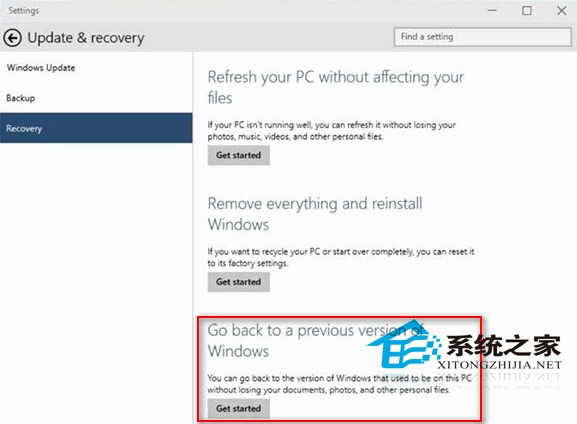
微軟在 Win10 早期建置中加入「回復到舊版 Windows」功能,讓用戶在升級後 30 天內(後縮短為 10 天)可無痛回滾,且保留個人檔案。這體現微軟對用戶體驗的重視與搶佔市場的決心。
DISM /Set-OSUninstallWindow
Windows.old
Win10 1903 後,「復原」頁面改為「回復」,功能入口相同。若超過期限或無 Windows.old,唯有重新安裝舊版系統。
Win10 C 槽空間暴跌?善用內建「磁碟清理」釋放數 GB 空間
Win10 鎖定畫面沒有關機鈕?專業版群組原則啟用、家庭版待登錄檔解法
Win10 開啟群組原則 (gpedit.msc) 報錯怎麼辦?一鍵修復 Microsoft-Windows-Geolocation-WLPAdm.admx
Windows 10 正式版發布時間線:技術預覽版搶先體驗與正式上市預測
Win10 將區域連線設為「依流量計費」阻擋自動更新:登錄修改 Ethernet 媒體成本
Win10 忘記登入密碼?利用 Sticky Keys 替換法在系統層級重置密碼(無需 PE、無需舊密碼)
Win10 開機後滑鼠無回應、開始畫面變黑?三大嘗試方案
Windows 10 使用 YY 語音有迴音解決:關閉麥克風監聽、增強、調整等級、允許獨佔模式