Windows XP Windows 7 Windows 2003 Windows Vista Windows 綜合教學 Linux 系統教學
Windows 10 Windows 8 Windows 2008 Windows NT Windows Server 電腦軟體教學

微軟釋出 Win10 Mobile 側載部署工具 WinAppDeployCmd

編輯:Windows 10 系統介紹

隨著 Windows 10 SDK Build 10166 釋出,微軟同步推出命令列工具 WinAppDeployCmd.exe,讓開發者能從 Win10 PC 透過 USB 或區域網路,將通用 Windows 平台 (UWP) 應用程式 (.appx) 側載部署至 Win10 Mobile 裝置,無需完整 Visual Studio 環境。
工具特色

  • 獨立命令列工具,安裝 Windows 10 SDK 即可取得。
  • 支援 USB 連線部署 .appx 套件。
  • 同一子網下可遠端部署,無需 Visual Studio 方案檔。
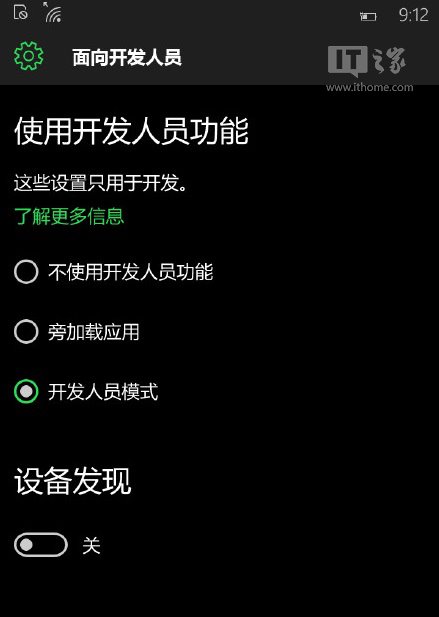
  • 需於手機啟用 [開發人員模式] 並允許側載。

WinAppDeployCmd 工具介紹

手機端啟用側載步驟

  1. 升級至 Win10 Mobile Build 10149 或更新版本。
  2. [設定] → [更新與安全性] → [開發人員專用]。
  3. 選擇 [開發人員模式],啟用裝置探索與裝置入口網站。

基本指令範例

WinAppDeployCmd.exe install -file "MyApp.appx" -ip 192.168.1.x -pin 123456

此工具大幅簡化 UWP 應用實機測試流程,特別適合 CI/CD 自動化部署場景。

Copyright © Windows教程網 All Rights Reserved