Windows 7 引入的「程式庫」功能延續至 Windows 10,但預設隱藏於檔案總管導覽窗格。啟用方式極簡單:
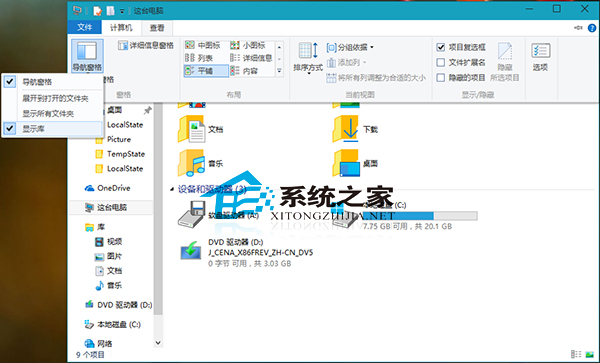
若不想佔用導覽窗格空間,也可將常用程式庫資料夾釘選到「快速存取」或加入「主資料夾」,依習慣調整動線。
升級 Windows 10 的四大關鍵理由:硬體門檻低、安裝簡單、新功能豐富、相容性佳
Win10 解鎖 Eva 移動版語音合成引擎:注冊表導入註冊 MSTTS_V110_enUS_EvaM Token
Win 10 執行《神界:原罪 2》藍屏?檢查補丁、重裝遊戲、換記憶體三步驟
Win10 升級失敗 0x30018:移除不相容防毒/驅動、有線網路、斷開 USB、SFC 掃描修復
Win10 安裝字體完整教學:複製到 Fonts 資料夾、右鍵安裝、PowerShell 批次部署
Win10 Mobile 新功能匯總:設定介面重設計、磚塊透明度可調、支援無線鍵鼠、行動熱點