Windows XP Windows 7 Windows 2003 Windows Vista Windows 綜合教學 Linux 系統教學
Windows 10 Windows 8 Windows 2008 Windows NT Windows Server 電腦軟體教學

Win10 升級報錯 0x80070002「找不到 boot.wim」?官方臨時修正方案

編輯:Windows 10 系統介紹

Win10 正式版釋出首日,大量用戶升級遭遇錯誤代碼 0x80070002,提示:「Windows 找不到所需的安裝檔案 [boot.wim]。請驗證安裝來源是否有效」。這是預下載檔案損毀或 $Windows.~BT 資料夾屬性異常導致。

✅ 微軟官方臨時解決方案

  1. 開啟檔案總管,啟用「隱藏項目」。
  2. 找到 C:\$Windows.~BT 資料夾(若不存在,表示預下載未完成,請等待 Windows Update 完成下載)。
  3. 複製 整個 $Windows.~BT 到非系統碟(如 D:\Win10_Install)。
  4. 右鍵複製後的資料夾 → 「內容」→ 取消勾選「唯讀」與「隱藏」→ 套用到此資料夾、子資料夾和檔案。
  5. 以管理員身分執行 D:\Win10_Install\Sources\Setup.exe。
  6. 依精靈完成升級。

🔍 為什麼有效?

原始 $Windows.~BT 可能因權限/屬性問題導致安裝程式無法正確讀取 boot.wim。複製並修正屬性後,Setup.exe 能順利存取所有安裝檔案。

💡 同場加映:錯誤 80240020 同樣適用

上一篇提到的「取得 Windows 10」工具錯誤 80240020,核心原因相同,同樣可用此法破解。
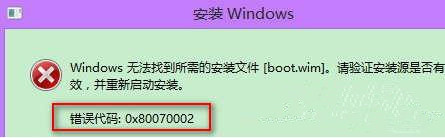
錯誤 0x80070002 畫面

Copyright © Windows教程網 All Rights Reserved