Microsoft Store 無法開啟、報錯 0x80072EFD,通常是網路連線設定或系統服務問題。兩大排查方向:
一、檢查 IE/Edge Proxy 設定
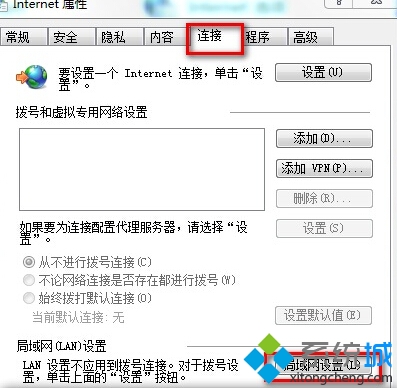
- 開啟 IE → 右上角齒輪 → 「網際網路選項」 → 「連線」索引標籤 → 「區域網路設定」。
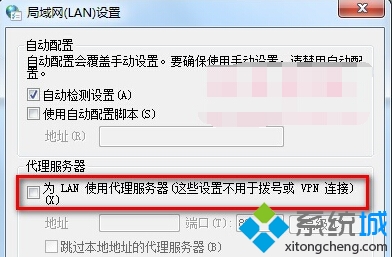
- 若「為 LAN 使用 Proxy 伺服器」被勾選,請取消勾選 → 確定。
二、確認防火牆與網路共用服務已啟用
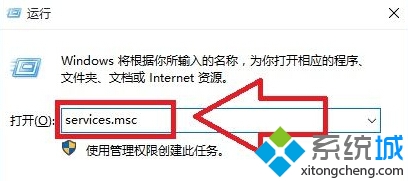
- 按 Win + R 輸入
services.msc 開啟服務管理員。
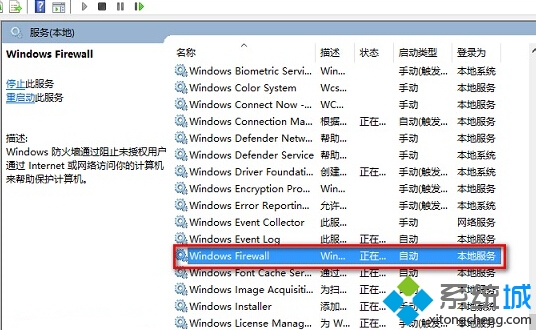
- 找到 Windows Firewall 與 Internet Connection Sharing (ICS) 兩項服務。
- 若非「執行中」,右鍵選「啟動」;並將「啟動類型」改為「自動」。
完成上述設定後重新開啟 Microsoft Store 通常即可恢復正常。