Windows XP Windows 7 Windows 2003 Windows Vista Windows 綜合教學 Linux 系統教學
Windows 10 Windows 8 Windows 2008 Windows NT Windows Server 電腦軟體教學

Win10 滑鼠右鍵失靈無反應?透過登錄檔修復 NoViewContextMenu 與重啟總管

編輯:Windows 10 系統介紹

滑鼠右鍵是桌面操作核心 (重新整理、另存圖片、內容選單等)。若硬體正常但右鍵失效,多半是登錄檔 NoViewContextMenu 被惡意軟體或誤操作設為 1 所致。以下提供 CMD 修復指令。

操作步驟

  1. 按 Win + X 選擇「命令提示字元 (系統管理員)」 (或 Windows PowerShell 管理員)。
  2. 執行以下指令修復登錄檔:
    reg add "HKEY_CURRENT_USER\Software\Microsoft\Windows\CurrentVersion\Policies\Explorer" /v "NoViewContextMenu" /t REG_DWORD /d 0 /f
  3. 接著重啟總管進程:
    taskkill /f /im explorer.exe && start explorer.exe
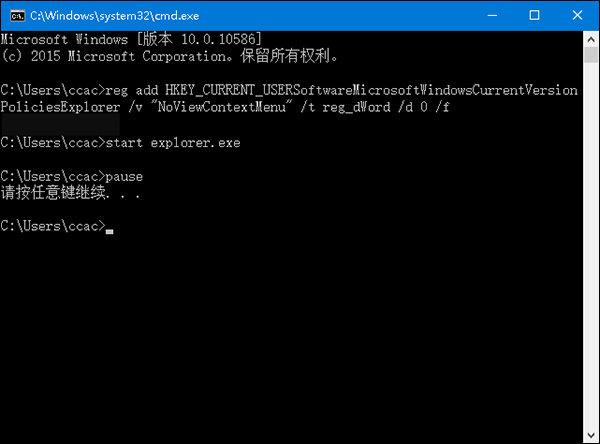
  4. 登出或重開機完成修復。

此法針對「右鍵選單完全不彈出」的情況。若右鍵選單彈出極慢,請參考另文《Win10 滑鼠右鍵反應時間太長怎麼辦?》清理 ContextMenuHandlers 登錄項。

Copyright © Windows教程網 All Rights Reserved