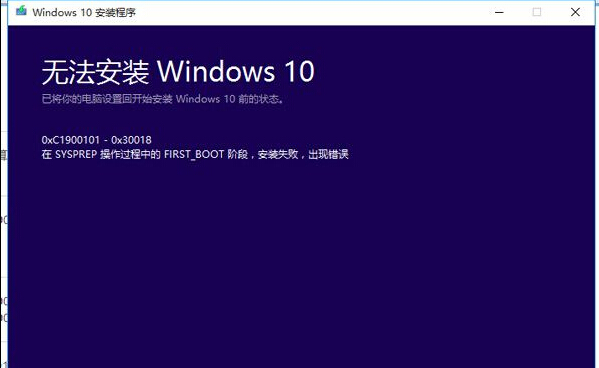
Win10 升級 TH2 (1511) 正式版時出現「無法安裝 Windows 10」錯誤 0xc1900101-0x30018,通常是核心更新服務未啟動導致安裝程式無法正常運作。啟動相關服務即可解決。
0xc1900101-0x30018
services.msc
這五項服務是 Windows 更新、授權驗證、檔案安裝的核心依賴。若被第三方優化工具誤停用,或系統損壞導致停止,升級即會失敗。啟用後通常能順利完成 TH2 升級。若仍失敗,建議使用 ISO 映像檔掛載執行 setup.exe 就地升級。
setup.exe
Windows 10 內建播放器 (WMP) 最小化後無聲音 Bug 暫時對策:勿最小化視窗、改調整大小
Win10 10074 修復 Edge 崩潰與開始功能表 Bug:安裝 KB3062095
Win10 取得系統最高權限:右鍵選單新增「取得超級管理員權限」登錄檔部署
Win10 自動隱藏工作列:右鍵屬性勾選一鍵設定騰出螢幕空間
Win10 滑鼠無法喚出右側邊欄?改用 Win+C 快速鍵開啟
美媒建議暫緩安裝 Windows 10 技術預覽版:App 崩潰頻繁、降級困難、觸控體驗未完成
Win 10 解除安裝程式在哪?控制台與設定 App 雙管道快速移除軟體
Win10 內建微軟拼音輸入法設定英文為預設輸入模式:四步驟完成,無需第三方工具