Windows XP Windows 7 Windows 2003 Windows Vista Windows 綜合教學 Linux 系統教學
Windows 10 Windows 8 Windows 2008 Windows NT Windows Server 電腦軟體教學

Windows 10 郵件應用同步錯誤 0x80c8043e 完整修復教學

編輯:Windows 10 系統介紹

升級 Win 10 後,「郵件」應用同步失敗顯示 0x80c8043e。核心解法是透過 PowerShell 移除損毀的應用佈建套件,再從商店重裝。

詳細步驟

  1. 返回傳統桌面,開啟開始選單搜尋 PowerShell,右鍵選「以系統管理員身分執行」。
  2. 輸入指令並按 Enter:
    Get-appxprovisionedpackage –online | where-object {$_.packagename –like "*windowscommunicationsapps*"} | remove-appxprovisionedpackage –online
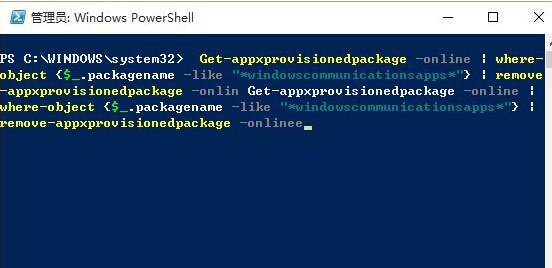
  3. 等待指令跑完,開啟 Microsoft Store 搜尋並重新安裝「郵件與行事曆」。

此法為微軟官方社群工程師提供,成功率極高,建議優先嘗試。

Copyright © Windows教程網 All Rights Reserved