Windows XP Windows 7 Windows 2003 Windows Vista Windows 綜合教學 Linux 系統教學
Windows 10 Windows 8 Windows 2008 Windows NT Windows Server 電腦軟體教學

Win10 應用商店無法開啟?刪除 LocalCache 快取資料夾修復

編輯:Windows 10 系統介紹

Microsoft Store(應用商店)點擊無反應、閃退、錯誤代碼 0x80072EFD,多為本地快取損毀。刪除 LocalCache 資料夾內容即可修復。

快取路徑

C:\Users\<使用者名稱>\AppData\Local\Packages\Microsoft.WindowsStore_8wekyb3d8bbwe\LocalCache

操作步驟

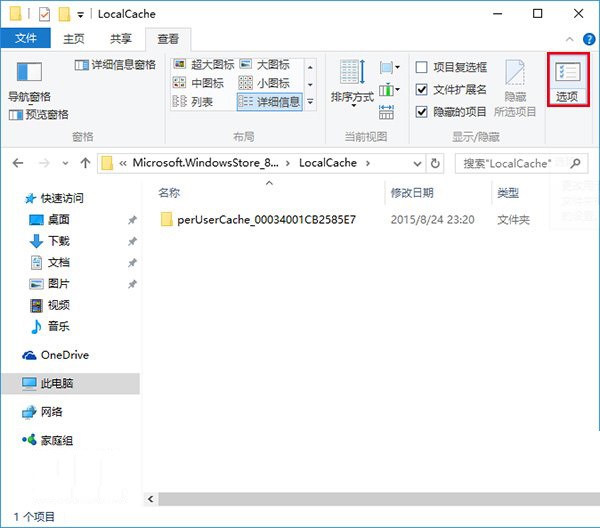
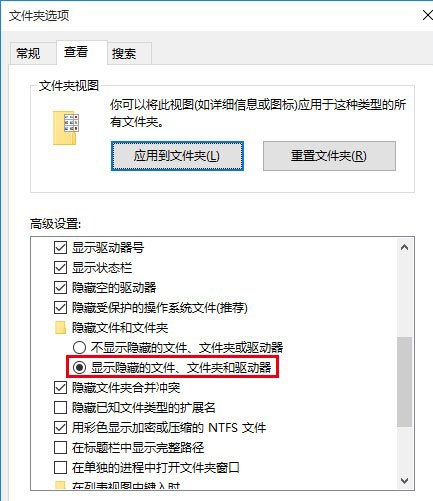
  1. 開啟檔案總管 → 「檢視」索引標籤 → 「選項」 → 「檢視」 → 勾選「顯示隱藏的檔案、資料夾和磁碟機」。
  2. 依上述路徑進入 LocalCache 資料夾。
  3. 全選刪除裡面所有檔案與子資料夾(快取會自動重建,放心刪除)。
  4. 重新開啟應用商店,功能恢復正常。

應用商店無法開啟錯誤

資料夾選項顯示隱藏檔案

進階修復(若無效)

  1. 以系統管理員身分開啟 PowerShell,執行:
    Get-AppxPackage Microsoft.WindowsStore | Foreach {Add-AppxPackage -DisableDevelopmentMode -Register "$($_.InstallLocation)\AppXManifest.xml"}


  2. 或於「設定 → 應用程式 → 應用程式與功能」找到 Microsoft Store → 「進階選項」 → 「修復」/「重設」。
Copyright © Windows教程網 All Rights Reserved