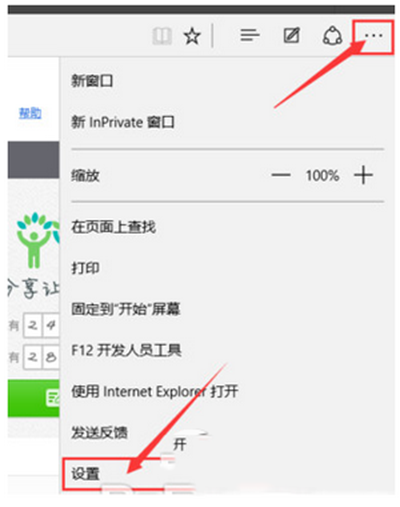
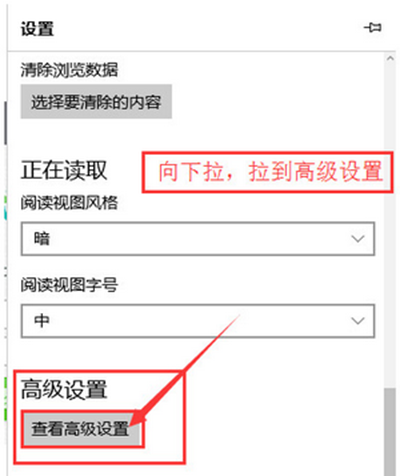
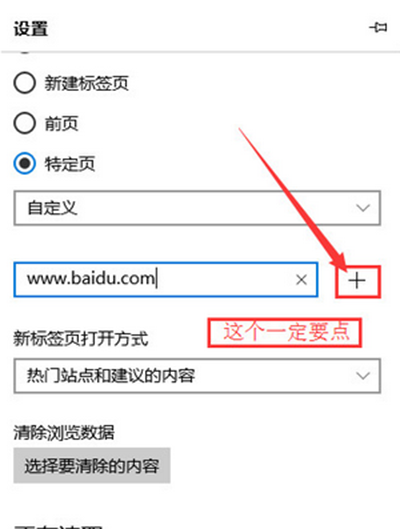
Windows 10 Edge 瀏覽器設定首頁位置較隱蔽,操作路徑:
設定後啟動 Edge 或點擊首頁圖示即直達指定網址。
Windows 10 技術預覽版官方下載地址、安裝金鑰、系統需求、語言版本完整資訊
Win10/8/7 修改「新增資料夾」預設命名規則:註冊表自訂前綴/格式
Win10 原生雙擊掛載 ISO 鏡像文件,無需虛擬光驅軟件
Win10 清理系統暫存檔:內建儲存體感知器一鍵釋放空間
Win10 10041 新功能深度解析:開始選單半透明、虛擬桌面拖曳、小娜登陸中國、網路飛出視窗改版、RAW 相簿支援
Windows 10 修改使用者密碼教學 (電腦管理 / 本地用戶和群組法)
Win10 技術預覽版安裝完全指南:原地升級法 vs 多系統分區法,圖文並茂最簡單
Win10 定時關機指令大全:at 排程與 shutdown 倒數計時兩種模式