Windows XP Windows 7 Windows 2003 Windows Vista Windows 綜合教學 Linux 系統教學
Windows 10 Windows 8 Windows 2008 Windows NT Windows Server 電腦軟體教學

Win10 360 瀏覽器打不開網頁但 Edge 正常?重置 Winsock/LSP 修復網路協定堆疊

編輯:Windows 10 系統介紹

Windows 10 升級後 360 瀏覽器無法連網,但 Edge 正常,主因 LSP (Layered Service Provider) 鏈損壞。修復方案:

方案一:重置 Winsock / 修復 LSP

  1. 管理員 CMD 執行 netsh winsock reset → 重新開機。
  2. 或用 360 安全衛士「LSP 修復工具」一鍵修復。

方案二:衝突軟體排除

解除安裝 ADBlock 廣告過濾大師、ADSAFE 淨網大師等可能衝突的網路過濾軟體。

方案三:需管理員權限才能開啟

解除安裝 360 瀏覽器重新安裝,權限問題通常可解決。

方案四:介面字體模糊

  • 系統 DPI 縮放過高 → 升級 360 安全瀏覽器 7.3 Beta/8.0 體驗版已優化高 DPI。
  • 停用/解除安裝「Hello 雅黑」等字體擴充套件。

方案五:Spartan (Edge) 核心支援

360 7.1 正式版/7.3 Beta 已支援在設定中啟用 Spartan 核心。
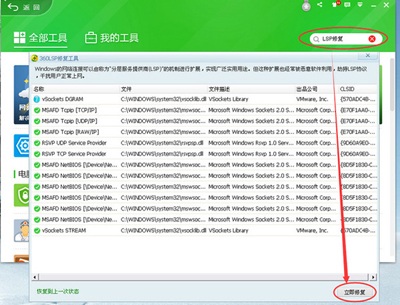
360 瀏覽器 LSP 連接

依序嘗試上述方案,多數情況可恢復 360 瀏覽器正常聯網。

Copyright © Windows教程網 All Rights Reserved