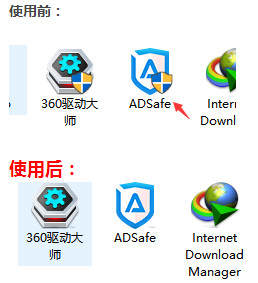
Windows 10 應用程式捷徑若需系統管理員權限執行,圖示上會疊加盾牌圖示 (UAC 標誌)。若嫌影響美觀,可下載批次檔一鍵移除。
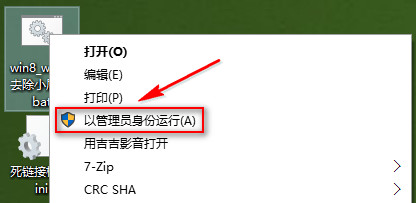
Win10去除小盾牌.bat
執行完成後,所有需管理員權限的捷徑圖示將不再顯示盾牌疊加圖示。此法不需進入控制台調整 UAC 等級,操作簡單直接。注意:移除盾牌圖示不代表停用 UAC 防護機制,僅移除視覺指示器。
Win10 精簡優化迅雷 9:群組原則/註冊表封鎖瀏覽器、播放器、遊戲中心等後台組件
Win7 藍畫面常見原因與修復方法完整指南
Win10 寫字板將文件另存為 TXT 純文字格式操作步驟
收不到 Win10 推播升級?兩大主因與解決方案
Win10 可登入 QQ 卻打不開網頁?DNS 劫持或協議遺失兩招解決
Win10 磁碟使用率 100% 完整解決方案:從 SSD 到服務優化
Windows 10 透裝置管理員更新顯示卡驅動程式
Win10 內建「磁碟管理」修復顯示 0 容量 U盤:新建簡單卷步驟詳解