建立自訂監控主控台
Win+R → mmc → 檔案 → 新增/移除嵌入式管理單元- 新增「可靠性與效能監視器」→ 確定
- 展開:主控台根節點 → 可靠性與效能 (本地) → 監視工具 → 效能監視器
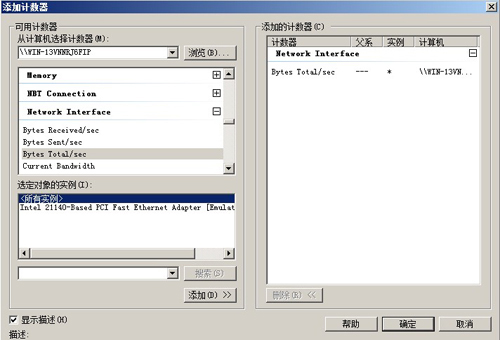
- 右鍵圖表區 → 新增計數器 → Network Interface → Bytes Total/sec → 新增 → 確定
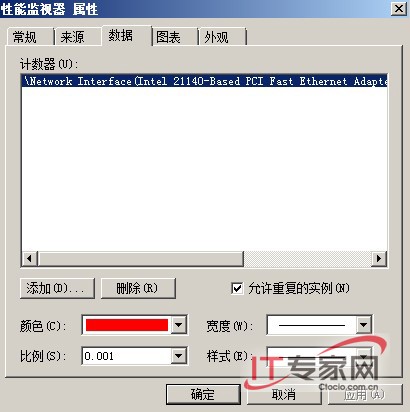
- 雙擊計數器 → 資料頁籤 → 比例設
0.001(KB/s) → 確定
- 另存為
test.msc 至桌面
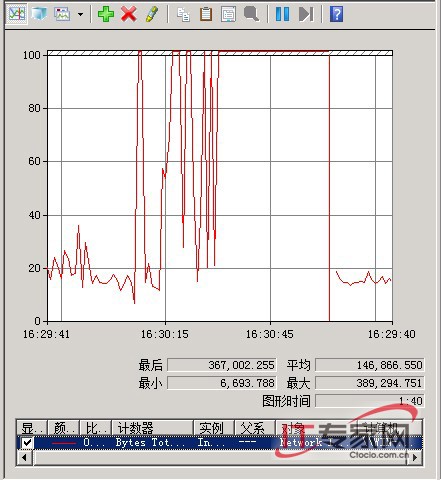
實測驗證:大檔傳輸流量暴增
遠端桌面對應本地磁碟複製大檔:
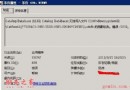
最小值 ~100 KB/s、最大值 ~400 KB/s、平均 ~250 KB/s,網卡滿載,圖表清晰呈現尖峰。
進階:流量限制方案
- QoS 封包排程器:群組原則配置輸出節流率
- Windows 防火牆進階安全性:建立輸出規則限制特定應用/埠頻寬
- 第三方工具:NetLimiter、cFosSpeed 等提供精細應用級控制
- Hyper-V 虛擬交換器:啟用頻寬管理(權重/上限/保留)
持續監控建議
建立資料收集器集合 → 排程記錄 → 設定警示臨界值 → 整合至 SCOM/Nagios 實現企業級頻寬治理。