系統啟動會自動載入所有硬體,若電腦僅安裝一顆硬碟,第二個 IDE 通道長期閒置卻仍被載入,浪費資源並拖慢開機。可透過裝置管理器關閉:
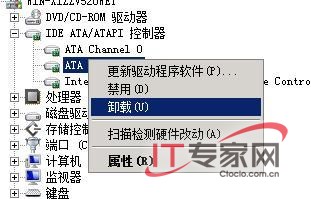
同理可關閉其他鮮少使用的硬體裝置,進一步提升系統運行效率。
Windows Server 2008 網路安全新特性與終端服務增強
強化 Windows Server 2008 列印管理三大實用技巧
關閉 Windows Server 2008 強制定期更改密碼策略
部署 Windows Server 2008 網域防火牆策略 強化網域安全
Windows Server 2008 對決 Windows Vista:核心架構、授權與適用場景深度比較
Windows Server 2008 R2 新功能全覽:64 位元專屬、256 邏輯處理器、Hyper-V 即時遷移
高效管理 Windows Server 2008 磁碟區陰影複製:vssadmin 指令實戰
SQL Server AlwaysOn 可用性群組跨 Windows Server 2008 R2 至 2012 叢集零停機遷移實戰