Server 2008 AD 引入無需重啟即可離線維護、精細權限委派、資料庫最佳化等功能,大幅簡化管理操作。
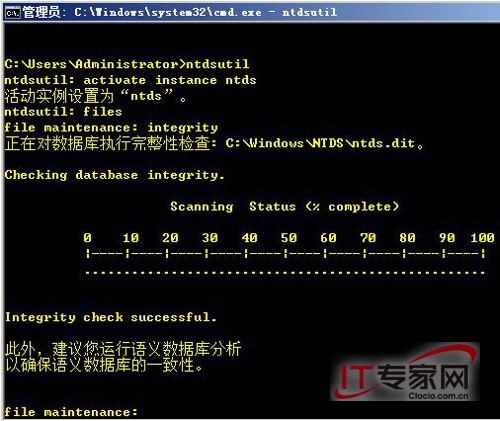
net stop ntds 停止 AD 服務 (同步停止檔案複寫、站台通訊、DNS 等相關服務),其他服務不受影響。ntdsutil 資料庫完整性驗證、碎片整理、移動資料檔/日誌檔 (copy/del)。net start ntds 重新啟動 AD,秒級切換,避免完整重開機停機時間。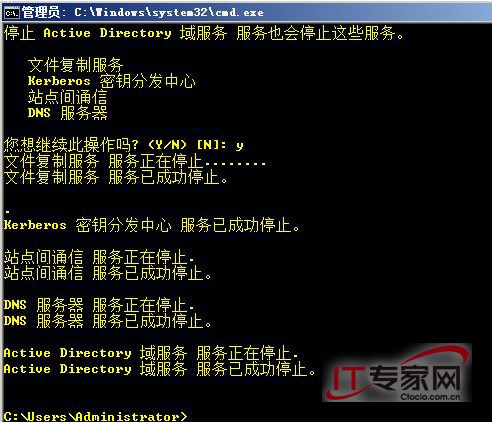
Enable-ADOptionalFeature 'Recycle Bin Feature' -Scope ForestOrConfigurationSet -Target ,刪除物件可還原保留屬性。善用新功能,讓 AD 管理更安全、彈性、高效。
Windows Server 2003 編輯 Boot.ini 完整指南:檢視、修改 ARC 路徑與多重開機修復
進階防護:修補 Windows Server 2008 防火牆註冊表被竄改風險
Windows Server 2008 裝置驅動程式安裝完整圖文教學
VMware 虛擬機安裝 Windows Server 2008 並以 DELL OEM SLP 方式離線啟用
Windows PowerShell 系統管理新體驗:從入門到實戰技巧
Windows Server 2008 版本差異完整解析:Standard、Enterprise、Datacenter、Web 與 Itanium 版比較