Windows XP Windows 7 Windows 2003 Windows Vista Windows 綜合教學 Linux 系統教學
Windows 10 Windows 8 Windows 2008 Windows NT Windows Server 電腦軟體教學
您现在的位置: Windows教程網 >> Windows教程 >  >> Windows Server 系統教學 >> Server 2008

用 Spotlight on Windows 即時監控 Windows Server 2008:安裝、連線建立與本地/遠端監控實戰

編輯:Server 2008

Windows Server 2008 內建監控工具功能有限,第三方工具 Spotlight on Windows (免費版) 能提供豐富視覺化儀表板,即時掌握 CPU、記憶體、磁碟 I/O、網路、服務狀態等關鍵指標,是 DBA 與系統管理員的得力助手。

快速上手三步驟

  1. 下載安裝: 官網 quest.com/spotlight-on-windows 下載,精靈式安裝無腦下一步。
  2. 建立連線:
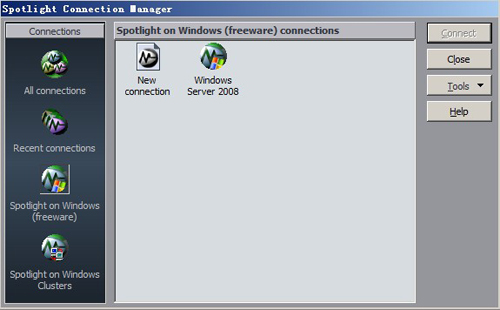
    • 啟動 Spotlight → 左側窗格右鍵 Spotlight on Windows (freeware) → Connection Manager
    • 雙擊 New Connection → 連線類型選 Spotlight on Windows (freeware) → 命名 (如 Windows Server 2008)
    • 本機監控:勾選 Local Machine
    • 遠端監控:輸入目標 IP、網域、帳號、密碼 (需目標開啟 WMI/防火牆例外)
  3. 啟動監控: 在「All connections」下雙擊建立的連線即進入即時儀表板。

Spotlight 連線管理視窗
圖 1:建立本機監控連線設定

核心功能亮點

  • 視覺化流程圖: 以圖形化管線呈現資源流向,異常即時紅燈警示
  • 多維度鑽取: 點擊任何元件 (CPU、鎖死、等待類型、磁碟佇列長度…) 即可深入細節
  • 叢集支援: Spotlight on Windows Clusters 可單一介面監控多節點叢集
  • 輕量無侵入: 無需在目標伺服器安裝代理程式,透過 WMI/效能計數器遠端蒐集

進階技巧

  • 右鍵連線 → Properties 可調整輪詢間隔、警示閾值、自訂計數器
  • 支援多連線分頁並排,便於同時監控生產與測試環境
  • 可匯出報表 (HTML/PDF) 供管理層審閱

Spotlight 免費版功能已足應付多數中小型環境監控需求,是預算有限時的首選利器。

Copyright © Windows教程網 All Rights Reserved