Server Core 安裝後無 GUI,必須用命令列完成網路基礎設定才能進行遠端管理。本文提供逐步指令:設定管理員密碼 (net user)、查詢網卡索引 (netsh interface ipv4 show interface)、設定靜態 IP/DHCP (netsh interface ipv4 set address)、設定 DNS (netsh interface ipv4 add dnsserver)、驗證 (ipconfig /all),完成即可啟用遠端 MMC/WinRS 管理。
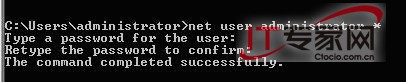
net user Administrator 新密碼
netsh interface ipv4 show interface
記下目標介面的 Idx 值(如 2)。

netsh interface ipv4 set address name="2" source=static address=192.168.1.233 mask=255.255.255.0 gateway=192.168.1.1
※ 請替換為實際 IP/網關/遮罩。

netsh interface ipv4 set address name="2" source=dhcp
netsh interface ipv4 add dnsserver name="2" address=192.168.1.180
可重複執行加入多組 DNS。
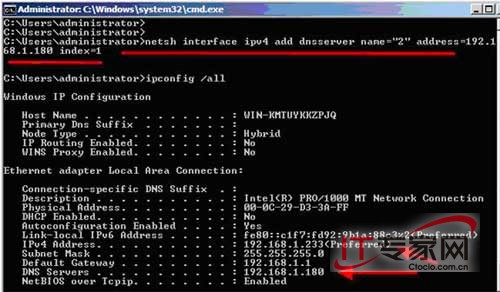
ipconfig /all
確認 IP、子網路遮罩、預設閘道、DNS 伺服器皆正確。
netsh advfirewall firewall set rule group="Remote Administration" new enable=yeswinrm quickconfigWindows Server 2008 網路鄰居常見五大故障與解決方案(找不到圖示、看不到共享、工作組消失、無法開啟共享、回應緩慢)
申請正版 Windows Server 2008 / R2 產品金鑰 (DreamSpark 學生授權流程)
Windows Server 2008 防火牆禁止 Ping (ICMP) 回應的配置方法
Windows Server 2008 關閉 Ctrl+Alt+Delete 登入強制組合鍵:群組原則 gpedit.msc 設定教學
Windows Server 2008 啟用桌面主題與 Aero 效果:安裝桌面體驗功能與 Themes 服務
Windows Server 2008 激活方法說明:正版授權管道與合規建議
解決 Visual Studio 2008 在 Windows Server 2008 上安裝失敗 (衝突 Office 2007 相容套件)