Windows XP Windows 7 Windows 2003 Windows Vista Windows 綜合教學 Linux 系統教學
Windows 10 Windows 8 Windows 2008 Windows NT Windows Server 電腦軟體教學
您现在的位置: Windows教程網 >> Windows教程 >  >> Windows 綜合教學 >> 關於 Windows

Windows 8 Win+PrtSc 全螢幕截圖自動存檔功能詳解:PNG 直存圖片庫

編輯:關於 Windows

Windows 8 引入 Win+PrtSc 組合鍵,一鍵完成全螢幕截圖並自動儲存為 PNG 檔案,大幅簡化截圖流程。

功能行為

  • 按下 Win+PrtSc → 螢幕瞬間變暗一次(視覺回饋)。
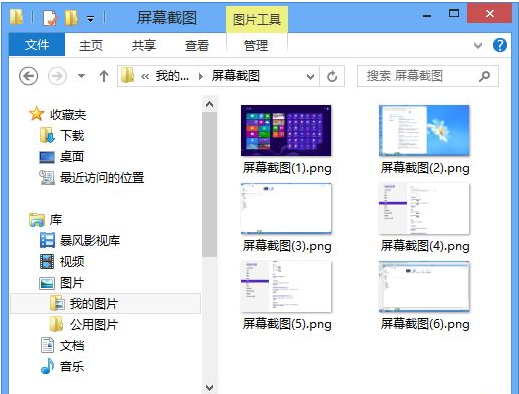
  • 截圖自動儲存至:圖庫\圖片\截圖(實際路徑:C:\Users\<使用者名稱>\Pictures\Screenshots)。
  • 檔名格式:截圖 (n).png,n 為阿拉伯數字,依截圖順序自動遞增。
  • 檔案格式固定為 PNG,無損壓縮,品質完美保留。

對照:其他截圖熱鍵

熱鍵行為儲存位置
PrtSc全螢幕複製到剪貼簿剪貼簿(需貼上才能存檔)
Alt+PrtSc作用中視窗複製到剪貼簿剪貼簿
Win+PrtSc全螢幕自動存檔Pictures\Screenshots

限制與補充

  • 僅支援全螢幕截圖,不支援「作用中視窗自動存檔」。
  • 若需自訂儲存路徑,可修改登錄檔 ScreenshotIndex 或使用符號連結重導向資料夾。
  • 此功能延續至 Windows 8.1/10/11,已成標準作業流程。

對於頻繁截圖記錄、文件編寫、問題回報的使用者,Win+PrtSc 是效率神器。

Copyright © Windows教程網 All Rights Reserved