Windows XP Windows 7 Windows 2003 Windows Vista Windows 綜合教學 Linux 系統教學
Windows 10 Windows 8 Windows 2008 Windows NT Windows Server 電腦軟體教學
您现在的位置: Windows教程網 >> Windows教程 >  >> Windows 綜合教學 >> 關於 Windows

Win8.1 滑鼠延遲/卡頓問題修復補丁 KB2908279 (遊戲玩家必裝)

編輯:關於 Windows

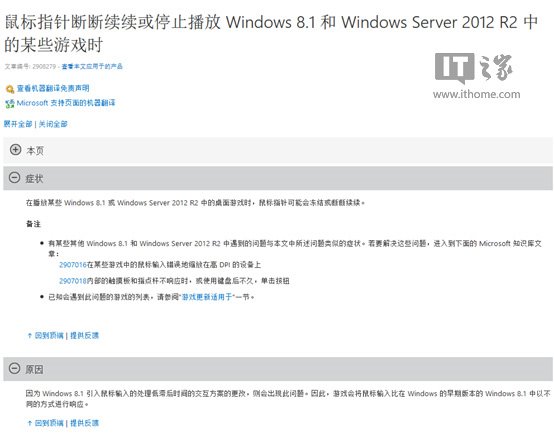
問題:Win8.1/Server 2012 R2 執行特定遊戲時滑鼠點擊無回應或鎖定

原因:Win8.1 變更滑鼠輸入處理機制,導致部分遊戲 (特別是 FPS、動作類) 出現滑鼠延遲。

受影響遊戲清單 (部分)

  • Call of Duty 系列 (Black Ops, MW2, MW3, Ghosts 等)
  • Counter-Strike: Global Offensive / Source
  • Deus Ex: Human Revolution / Director's Cut
  • Hitman Absolution / Sniper Challenge
  • Half-Life 2
  • Metro 2033
  • Portal
  • Tomb Raider

解決方法:安裝官方修復補丁 KB2908279

  • 32 位元系統 (x86):
    https://download.microsoft.com/download/C/9/F/C9F5D9A7-6D45-404C-8A7F-EC72BBC01EF6/Windows8.1-KB2908279-x86.msu (2.8 MB)
  • 64 位元系統 (x64):
    https://download.microsoft.com/download/3/6/9/369CDEBA-1AD4-420A-818A-8CB6CB3412CE/Windows8.1-KB2908279-x64.msu (3.1 MB)

下載對應版本執行安裝,重新開機後即可解決遊戲滑鼠延遲問題。

KB2908279 補丁說明
Copyright © Windows教程網 All Rights Reserved