Build 9926 正式引入 Cortana,語音喚醒目前僅支援英文環境,設定流程如下:
前置條件:系統語言設為美式英文
- 設定 → 時間與語言 → 區域與語言 → 國家/地區選「美國」,語言新增 English (United States)。
- 設定 → 系統 → 語音 → 語言確認為 English (United States)。
啟用語音喚醒
- 點擊工作列 Cortana 搜尋框 → 左上角三條線圖示進入設定。
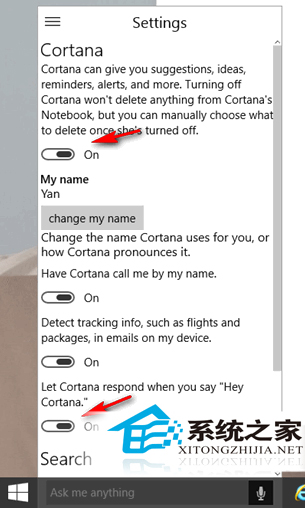
- 確保「Cortana」開關為 On。
- 將最下方 「Hey Cortana」** 開關設為 On(需裝置內建/外接麥克風)。
使用技巧
說出 「Hey Cortana」** 後可直接接續指令(如「Hey Cortana, 明天天氣」),無需等待回應再提問。如同「芝麻開門」咒語,瞬間喚醒智慧助理。
註:中文版 Cortana(小娜)尚未上線,目前僅能以英文互動。