傳統作法需進入「資料夾選項」勾選顯示隱藏檔案,Windows 8 引入 Ribbon 介面後,只需在檔案總管「檢視」索引標籤勾選「隱藏的項目」即可瞬間顯示,無需開啟多層對話框。
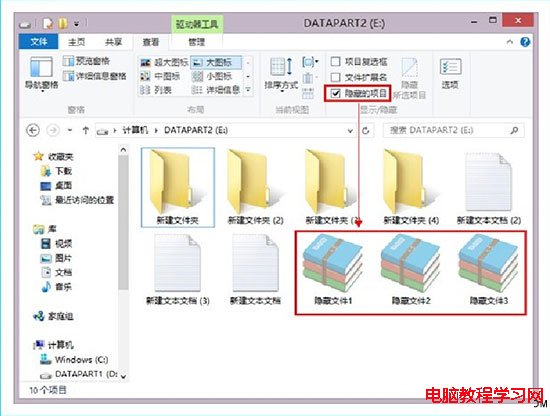
這項改良讓頻繁切換隱藏檔案可見性的使用者大幅節省時間,建議善用此功能。
Win7 旗艦版虛擬記憶體優化設定:自訂大小 1.5 倍實體記憶體,提升遊戲效能
Win8.1 與阿里旺旺不相容怎麼辦?360 徹底解除安裝清理註冊表後重裝
Win7 線上看影片出現黑畫面或白塊 關閉 GPU 硬體加速改用軟體繪圖解決
Win10 15014 新功能彙總:Windows Store 電子書上架、Edge 閱讀器強化、自訂強調色、儲存空間自動清理、Wi-Fi 設定整合、電源滑桿
Windows 7 IIS 架設 FTP 伺服器完整圖文教學(旗艦版專用)
微軟釋出 Win10 Mobile 10240 模擬器官方下載,供 PC 端測試行動版系統