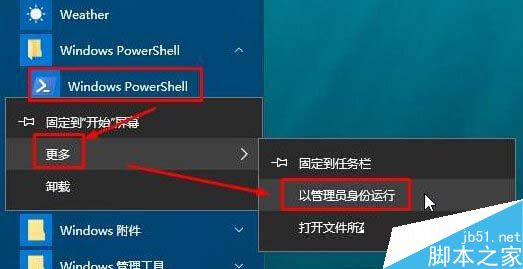
誤刪 Win10 內建 App 想找回?PowerShell 以管理員身分執行一行指令即可批次恢復所有預設應用。
Get-AppxPackage -AllUsers | Foreach {Add-AppxPackage -DisableDevelopmentMode -Register "$($_.InstallLocation)\AppXManifest.xml"}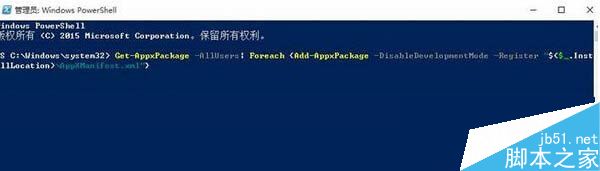
簡單兩步驟,無需重裝系統或逐個下載,PowerShell 強大模組化部署機制自動完成還原。
Windows 7 任務列通知區域清理指南:移除無效殘留圖示
聯想 ThinkPad S3 系列筆電 Windows 8 改裝 Windows 7 完整 BIOS 設定教學
微軟推送 Win10 Mobile 10536 快速通道設定更新:為新版本鋪路
Win7 桌面圖示變成只有文字?刪除 Shell Icons 登錄鍵一鍵修復
Windows 10 Build 10240 仍在蒐集用戶資料:預設「完整」診斷,7/29 正式版前停止
這就是新 Aero?Win10 10120 洩露截圖:視窗標題列變半透明
Win7 無法開機錯誤 File:\BOOT\BCD status 0xc000000f/0xc0000001?修復引導與重建 MBR 雙管齊下