Windows 7 執行 Windows Update 出現 8024402F(WU_E_PT_ECP_SUCCEEDED_WITH_ERRORS / 連線逾時/伺服器忙碌/Proxy 干擾/加密服務異常),本文提供三階段排查:網路/軟體干擾、系統檔案修復、加密元件重新註冊。
| 類別 | 可能原因 |
|---|---|
| 網路 | WU 伺服器忙碌、ISP DNS 解析失敗、Proxy/VPN 干擾、MTU 封包過大 |
| 軟體干擾 | 第三方防火牆、防毒、網頁加速器、網路監控工具攔截 WU 流量 |
| 系統元件 | Cryptographic Services 停止/損壞、相關 DLL 遺失或未註冊 |
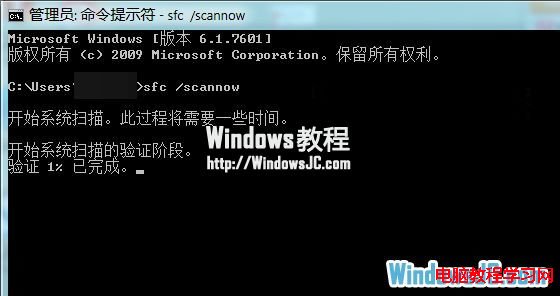
cmd → Ctrl+Shift+Enter 管理員 CMD。sfc /scannow,等待完成(修復損壞系統檔)。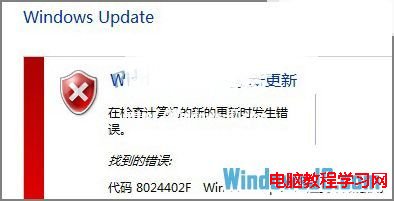
regsvr32 /s C:\Windows\System32\cryptdlg.dll
regsvr32 /s C:\Windows\System32\dssec.dll
regsvr32 /s C:\Windows\System32\gpkcsp.dll
regsvr32 /s C:\Windows\System32\initpki.dll
regsvr32 /s C:\Windows\System32\mssip32.dll
regsvr32 /s C:\Windows\System32\rsaenh.dll
regsvr32 /s C:\Windows\System32\sccbase.dll
regsvr32 /s C:\Windows\System32\slbcsp.dll
regsvr32 /s C:\Windows\System32\softpub.dll
regsvr32 /s C:\Windows\System32\wintrust.dll
ReRegisterCrypto.bat 執行:@echo off
Regsvr32 /s C:\Windows\System32\cryptdlg.dll
Regsvr32 /s C:\Windows\System32\dssec.dll
Regsvr32 /s C:\Windows\System32\gpkcsp.dll
Regsvr32 /s C:\Windows\System32\initpki.dll
Regsvr32 /s C:\Windows\System32\mssip32.dll
Regsvr32 /s C:\Windows\System32\rsaenh.dll
Regsvr32 /s C:\Windows\System32\sccbase.dll
Regsvr32 /s C:\Windows\System32\slbcsp.dll
Regsvr32 /s C:\Windows\System32\softpub.dll
Regsvr32 /s C:\Windows\System32\wintrust.dll
echo 完成,請重開機後再試 Windows Update.
pause
若上述無效,執行以下指令重設 WU 元件(管理員 CMD):
net stop wuauserv
net stop bits
net stop cryptsvc
ren C:\Windows\SoftwareDistribution SoftwareDistribution.old
ren C:\Windows\System32\catroot2 catroot2.old
net start wuauserv
net start bits
net start cryptsvc
將 DNS 改為 8.8.8.8 / 8.8.4.4 (Google) 或 208.67.222.222 / 208.67.220.220 (OpenDNS),避免 ISP DNS 解析 windowsupdate.microsoft.com 失敗。