Windows XP Windows 7 Windows 2003 Windows Vista Windows 綜合教學 Linux 系統教學
Windows 10 Windows 8 Windows 2008 Windows NT Windows Server 電腦軟體教學
您现在的位置: Windows教程網 >> Windows教程 >  >> Windows 綜合教學 >> 關於 Windows

Win7 桌面小工具卡頓/停滯解決方案:清理 Sidebar 快取重置服務

編輯:關於 Windows

Win7 桌面小工具運行一段時間後出現凍結、更新停滯,而其他程式正常,主因通常是 Sidebar.exe 快取過大或損毀。以下提供完整重置流程。
解決步驟

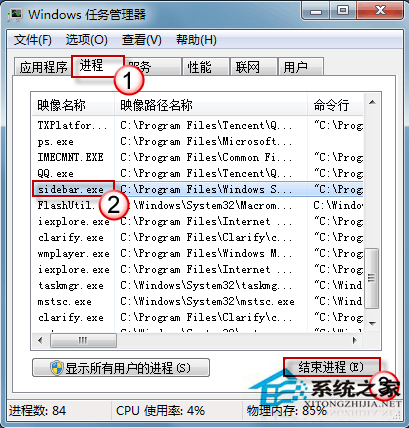
  1. 結束 Sidebar 進程:`Ctrl+Shift+Esc` 開啟工作管理員 → 「進程」頁籤 → 找 `sidebar.exe` → 右鍵「結束進程」。
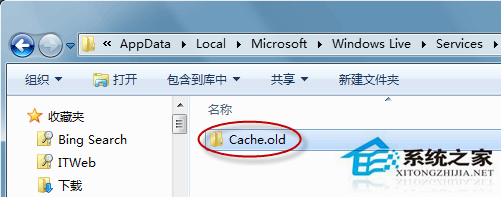
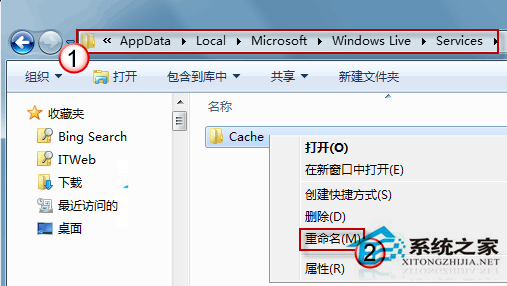
  2. 重命名 Windows Live Services 快取:`Win+E` 開啟總管 → 地址列貼上 `%localappdata%\Microsoft\Windows Live\Services` → 將 `Cache` 資料夾改名為 `Cache.old`。
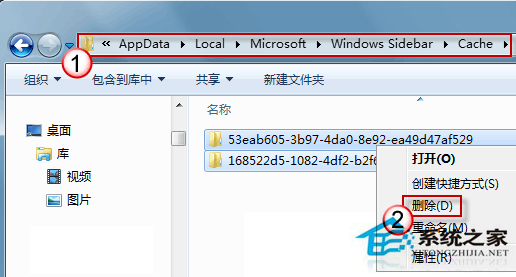
  3. 刪除 Sidebar 快取:地址列貼上 `%localappdata%\Microsoft\Windows Sidebar\Cache` → 全選刪除所有檔案(系統會自動重建)。
  4. 清理第三方小工具快取:檢查 `%localappdata%\Microsoft\Windows Sidebar\Gadgets` 下各小工具資料夾,若含 `Cache` 同步刪除。
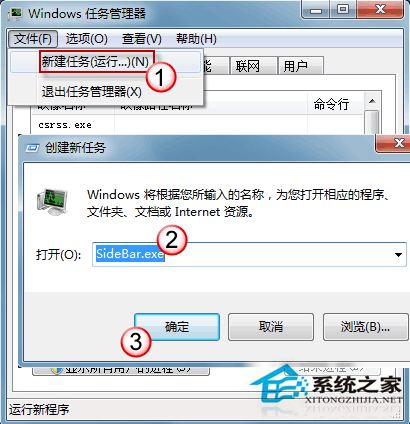
  5. 重新啟動 Sidebar:工作管理員 → 「檔案」 → 「新增工作」 → 輸入 `sidebar.exe` → 確定。

預防建議

  • 避免同時啟用過多小工具(建議 ≤3 個)。
  • 定期重啟 Sidebar 或重開機釋放記憶體。
  • 僅保留必要小工具,減少資源佔用。

此法可徹底解決小工具凍結、天氣不更新、CPU 佔用異常等問題,無需重裝系統。

Copyright © Windows教程網 All Rights Reserved