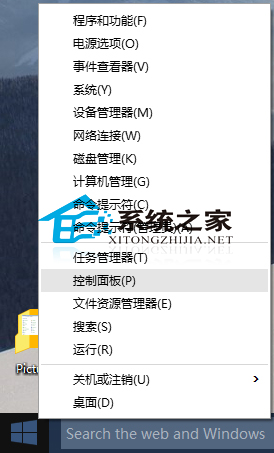
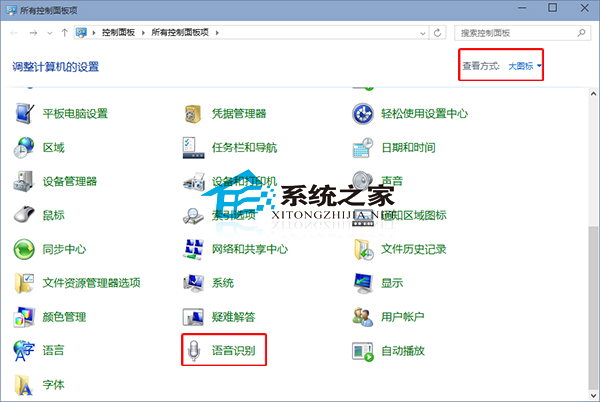
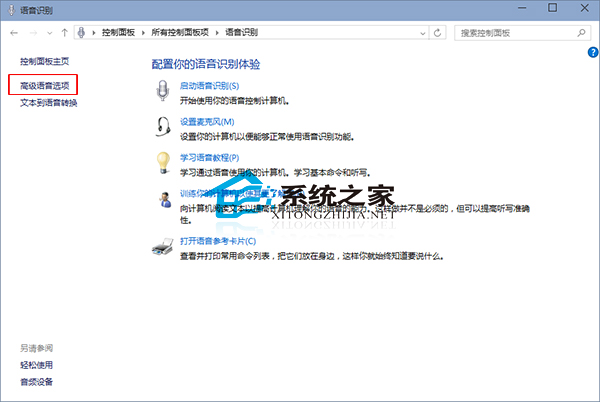
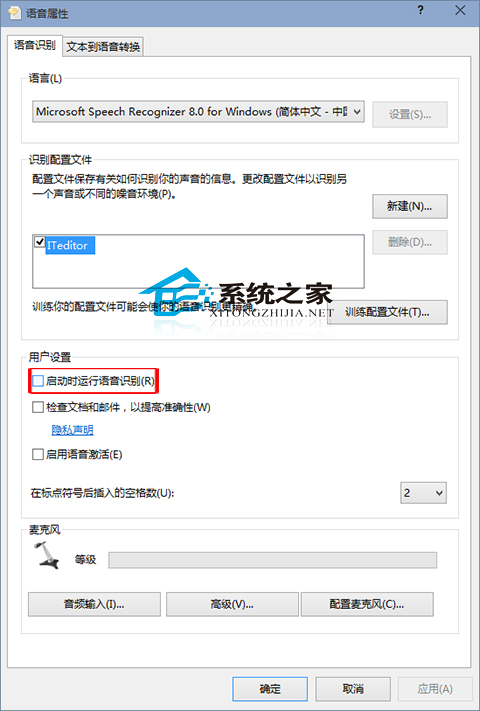
Win10 每次開機自動啟動語音辨識,若不常用屬干擾。停用步驟:
延伸閱讀:《Win10 9926 如何語音喚醒小娜》掌握 Cortana 語音啟用技巧。
Win10 vs Win7 深度對比:新系統究竟好在哪?升級前必看分析
Win10 專業版移除關機選單「登出」選項:群組原則一鍵隱藏防止誤觸
Win8 關機提示「磁碟機中沒有磁碟」解決方法
Win 10 如何啟用 Win 7/8.1 風格「通知區域圖示」設定介面?建立捷徑一鍵存取
Windows 7 設定自動同步網路時間教學:與網際網路時間伺服器同步
Win10 如何喚喚小冰進行「顏值測試」?上傳大頭照獲取 AI 顏值分析
Win7 釋放 20% 預留頻寬加快網速:群組原則關閉 QoS 封包排程器限制
關閉 Windows 自動更新服務完整教學:服務管理、群組原則、登錄檔三大方案