Windows XP Windows 7 Windows 2003 Windows Vista Windows 綜合教學 Linux 系統教學
Windows 10 Windows 8 Windows 2008 Windows NT Windows Server 電腦軟體教學
您现在的位置: Windows教程網 >> Windows教程 >  >> Windows 綜合教學 >> 關於 Windows

Win7 寬帶連線錯誤 711 五大解法:服務、補丁、批次檔、指令、重灌

編輯:關於 Windows

Win7 撥號報錯 711 (遠端連線錯誤),五種修復方案:

方法一:服務與登錄 (針對 Win7)

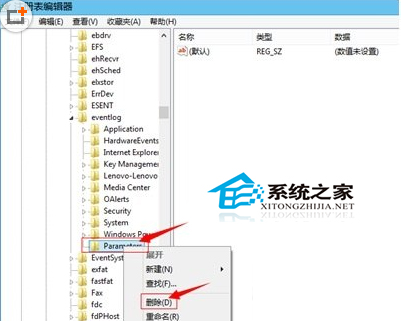
  1. services.msc 啟用「Remote Access Auto Connection Manager」;失敗則進註冊表 HKEY_LOCAL_MACHINE\SYSTEM\CurrentControlSet\services\eventlog 備份並刪除 Parameters 子機碼。

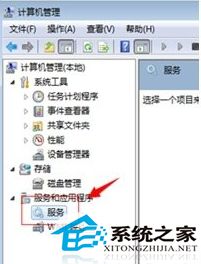
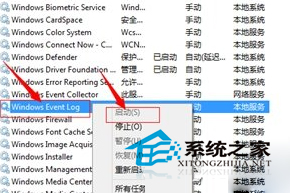
  2. 重新啟動四項服務:Windows Event Log、Secure Socket Tunneling Protocol Service、Telephony、Remote Access Auto Connection Manager。

方法二:解除安裝更新補丁 KB917606

控制台 → 程式和功能 → 檢視已安裝更新 → 找 KB917606 → 解除安裝。

方法三:批次檔設為關機腳本

  1. 記事本存為 711.bat 內容:
    @ECHO OFF
    takeown /f "C:\Windows\System32\LogFiles\WMI" /r /d y && icacls "C:\Windows\System32\LogFiles\WMI" /grant administrators:F /t
  2. gpedit.msc → 電腦設定 → Windows 設定 → 指令碼 (啟動/關機) → 關機 → 新增 711.bat → 重開機。

方法四:命令提示字元重設 Winsock

cmd → netsh winsock reset → 重開機 (僅 Win7 有效)。

方法五:以上皆失效 → 重灌系統

依序嘗試,多數在方法一或四解決。

Copyright © Windows教程網 All Rights Reserved